OMSA is gone: what replaces it on Dell servers and what OME is for
Dell has retired OMSA. What replaces it on a single server, what OpenManage Enterprise does, what it costs and how to reach servers at other sites with it.

In short
OpenManage Server Administrator (OMSA) has had no new releases since September 30, 2024, and goes out of support on September 30, 2027. On a single server, iDRAC9 and the iDRAC Service Module replace it at no cost. OpenManage Enterprise (OME) is the free console that brings several servers together, including servers at other sites, through a VPN tunnel that ends next to the iDRAC port. You only pay for the iDRAC Enterprise license, if you want the virtual console.
This week I installed a Dell PowerEdge T360 server at a new client. After the installation I went, as usual, to the Dell support page to download the latest updates and OpenManage Server Administrator. The program was no longer there. In its place, the download list pointed to OpenManage Enterprise and to a whole family of applications with similar names: Update Manager, Services, AIOps, Integration for VMware vCenter.
If you have been managing Dell servers for a few years, OMSA was the reflex: you installed it in Windows and saw the temperatures, the disks, the RAID controller and the alerts. Its disappearance raises two questions: what do you monitor the server with from now on, and what are the new applications.
OMSA is retired, not replaced by OME. On a single server its place is taken by iDRAC and the iDRAC Service Module, while OpenManage Enterprise is the central console for anyone with several servers, possibly at several clients. A company with a single server doesn't need OME. For anyone managing servers remotely, it is free and worth setting up once.
What happened to OMSA
Dell officially announced the retirement on its dedicated page on the support site. The last release came out on September 30, 2024. Until September 30, 2027, the program only receives security fixes and fixes for critical issues, then it goes out of support completely.
The last release only works with 14th, 15th and 16th generation servers and does not work on Windows Server 2025. On a new server with the current operating system, OMSA is no longer an option, not even temporarily.
Dell's stated reason is its "agent-free" strategy: everything OMSA did from inside the operating system is now done from iDRAC, the management controller built into the motherboard. iDRAC works independently of the operating system, so it sees the server even when Windows hasn't started or the system disk has failed.
What replaces OMSA on a single server
Two components, both included in the price of the server.
iDRAC9 is the management controller. It has its own web interface, its own network port, and sees the sensors, the disks, the RAID controller, the hardware log and the firmware. It sends alerts by SNMP and email and updates firmware without any program installed in the operating system.
iDRAC Service Module (iSM) is the only thing still installed in Windows or Linux. It is a small service that connects iDRAC to the operating system: iDRAC learns the machine name and the IP addresses, and hardware events reach the Windows event log. In practice, iSM is the new OMSA, reduced to what iDRAC can't find out on its own.
What you can do with iDRAC depends on the license, which is perpetual and tied to the server's service tag.
| iDRAC9 license | What it adds | Standard on |
|---|---|---|
| Basic | Web interface, Redfish, SNMP, monitoring, firmware updates | The 100-500 series, including the T360 |
| Express | Extended remote management and lifecycle features | The 600 series and up |
| Enterprise | Virtual console, virtual media, configuration lockdown | Optional, at purchase or later |
| Datacenter | Detailed telemetry, power and thermal metrics | Optional |
A detail that confused administrators this year: some firmware versions showed "Express" on the R360 and T360, although the standard license for these models is Basic. Dell confirmed in the dedicated support article that firmware 7.10.50.00 and later show Basic correctly. For monitoring, alerts and updates, Basic is enough. For the virtual console, meaning the server's screen in the browser when Windows no longer responds, you need Enterprise.
Firmware updates on a single server are done from the iDRAC interface, under Maintenance, System Update, or with Dell System Update run in the operating system.
What OpenManage Enterprise is and what the applications around it do
OpenManage Enterprise is a ready-made virtual machine that you import into Hyper-V, VMware, KVM or Proxmox. It isn't installed on the server but next to it. It discovers the servers through iDRAC, keeps their inventory, shows the state of the whole fleet on a single screen, receives the alerts and applies firmware updates to several servers at once. The other names in the download list are extensions of this console or separate update tools.
| Component | What it does | Where it runs |
|---|---|---|
| OpenManage Enterprise | Inventory, monitoring, alerts, updates for the whole fleet | Its own virtual machine |
| Update Manager | Local firmware repository, for networks without internet or with many servers | Plugin in OME |
| Services (formerly SupportAssist Enterprise) | Automatically opens cases with Dell for servers with ProSupport | Plugin in OME |
| AIOps Infrastructure Observability (formerly CloudIQ) | Sends inventory and health to the Dell cloud portal | Plugin in OME |
| Integration for VMware vCenter, SCVMM, SCOM | Brings Dell inventory and updates into the VMware or Microsoft consoles | Plugin in OME |
| Power Manager | Power monitoring and capping | Plugin in OME, licensed |
| OpenManage Enterprise Modular | Only for MX chassis | In the chassis |
| Dell System Update, Repository Manager | Updates on a single server, or an ISO with all the updates for a model | On the management workstation |
The resources the appliance needs are modest for a small fleet. The support matrix for version 4.7 asks, for fewer than 1,000 devices, for 4 cores and 19 GB of RAM, with two virtual disks of 415 GB each. Hyper-V on Windows Server 2022 and 2025 is supported, and so is Proxmox VE 9.
What it costs
The console itself is free and needs no key. Monitoring, inventory, alerts, groups, firmware updates, reports and the API are included. Dell states explicitly in the OME FAQ that installing and using the console doesn't require the Advanced license.
The OpenManage Enterprise Advanced license is bought per server, is perpetual and is tied to the service tag. It is required for automatically applying configuration templates to new servers, for automatic remediation of configuration drift, for booting from an ISO through OME and for the Power Manager plugin. The Advanced+ edition unlocks the VMware and Microsoft integration plugins. There is a 90-day trial.
The Services and AIOps plugins are free, but they only work for servers with an active ProSupport or ProSupport Plus contract, because they open cases with Dell and send data to the Dell cloud.
For an IT services company with a few clients and servers on the Basic or Express license, OME costs nothing. The only license you probably want on each server is iDRAC Enterprise, for the virtual console, and that one has nothing to do with OME.
How to reach servers at other sites with OME
OME doesn't have to be on the same network as the servers. It talks to each iDRAC over a routable IP, so it works through any VPN. The part that catches people off guard is the direction of the traffic: during a firmware update, OME tells the iDRAC to download the package from OME, so the iDRAC must also reach OME, not just the other way around.
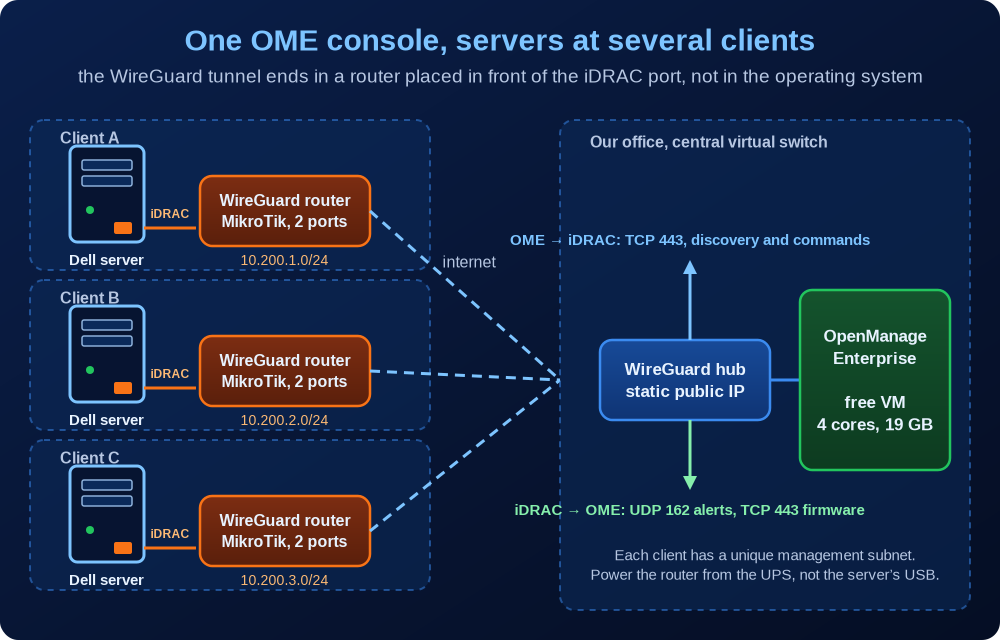
The ports below are the ones in the OME user's guide, section "Supported protocols and ports".
| Direction | Port | Role |
|---|---|---|
| OME to iDRAC | TCP 443 | Discovery, inventory, commands over Redfish and WS-Man |
| OME to iDRAC | UDP 161 | SNMP queries, optional for iDRAC9 |
| iDRAC to OME | UDP 162 | Real-time SNMP alerts |
| iDRAC to OME | TCP 443 or 445 | Downloading firmware packages and templates from the appliance |
| OME to the operating system | TCP 22, 5985, 5986 | Only if you also discover the operating system; not needed with iDRAC |
iDRAC can't start a VPN tunnel on its own. A WireGuard client started from Windows doesn't help, because it dies together with Windows, exactly when you need iDRAC. The tunnel has to end on a network device placed in front of the iDRAC port. If you manage the client's internet router and it supports WireGuard, put the iDRAC in a management VLAN routed through the tunnel and you're done. If not, a small router with two Ethernet ports, for example a MikroTik mAP or hAP, does the same job: one port to the client's network, one port to the iDRAC, the tunnel to the hub.
How this router is powered matters. On many servers the USB ports lose power when the server is shut down but still plugged in, so a router powered from the server's USB dies with it, and you can no longer power on the server from iDRAC. Power it from the UPS or over PoE, and test: shut down the server from Windows and check whether iDRAC still responds through the tunnel.
Each client gets a unique management subnet, for example 10.200.X.0/24, because OME identifies alerts by the source IP address. On the router, allow from the tunnel to the iDRAC only the OME address and your workstation, and block access from the client's network to the iDRAC.
How to enroll a server in OME
There is no "add device" form. Enrollment is done through a discovery job, which also accepts a single IP.
- In OME, open Monitor, Discovery, Create.
- Give the job a name, choose the Server type and enter the IP address or name of the iDRAC. Several addresses go one per line.
- Enter the iDRAC username and password. Check Onboarding with the OME-managed option, otherwise the server is only monitored and you can't send it commands.
- Run the job. The server stays in the inventory after the job finishes.
- Create a static group for each client, under Devices, Static Groups, and move the server there. Technicians who see only certain clients get the Device Manager role limited to that group.
- In iDRAC, set the alert destination to the OME address, under Configuration, System Settings, Alert Configuration.
When you change the IP address of an iDRAC that is already enrolled, you run the job again with the new address. OME recognizes the server by its service tag.
Where it doesn't fit
OME only sees Dell hardware. An HPE, Lenovo or Supermicro server shows up at most as a generic SNMP device, with no inventory and no updates. If the fleet is mixed, OME covers only the Dell part.
OME sees the server, not what runs on it. It doesn't tell you that drive C is full, that the SQL Server service has stopped or that Windows hasn't received updates in two months. For that you need monitoring at the operating system level, and that remains a separate tool.
For a company with a single server, OME is useless. iDRAC with email alerts and iSM cover everything OMSA did, with no extra virtual machine.
12th and 13th generation servers have iDRAC7 or iDRAC8, with fewer features. OME discovers and monitors them, but this is where the retirement of OMSA hurts the most, and the long-term solution is replacing the server.
How we do it
At the clients we manage, hardware monitoring and operating system monitoring are two separate layers. We see Dell hardware through iDRAC, and where there are several servers we bring them together in a central OME console, through exactly the tunnels described above. The operating system, the services, Windows updates and the MikroTik routers that hold the tunnels we see through Brio Endpoint Manager, our monitoring platform, which can also provision the WireGuard tunnels. Both are part of our outsourced IT management service, and the pace at which updates are applied is the one described in the article about the October 2026 patches (available in Romanian).
If you have a Dell server installed in the last few years and you don't know what iDRAC license it has or whether it sends alerts when a disk fails, send us its service tag and we'll tell you in a few minutes what your server sees on its own and what it doesn't.
Frequently asked questions
Can I still install OMSA on a new server?
The last OMSA release can still be downloaded and works on 14th, 15th and 16th generation servers with Windows Server 2022 or an older version. It doesn't work on Windows Server 2025 and no longer gets new features. After September 30, 2027, it no longer gets security fixes either, so it isn't worth installing on a new server.
Is OpenManage Enterprise free?
Yes. The console is downloaded without a license and includes monitoring, inventory, alerts, groups and firmware updates for any number of servers. You only pay for the Advanced license, per server, for automatic configuration deployment, booting from ISO and the Power Manager plugin, and for the Advanced+ license for the VMware and Microsoft integrations.
What iDRAC license do I need to use OME?
Basic, the standard license on the 100-500 series including the T360, is enough for discovery, monitoring, alerts and firmware updates from OME. The virtual console, meaning the server's screen in the browser, requires the iDRAC Enterprise license whether you open it from OME or directly from iDRAC.
Does OME work with servers at other clients, in other cities?
Yes, as long as OME and each iDRAC can see each other over IP, usually through a VPN tunnel. The tunnel has to end on a router placed in front of the iDRAC port, not in a VPN client in the operating system, because iDRAC must stay reachable even when the server is shut down. Each client needs a unique management subnet.
Can I add a server to OME by IP, without scanning the whole network?
Yes. The discovery job under Monitor, Discovery accepts a single IP or host name, with the corresponding iDRAC credentials. The server stays in the inventory after the job finishes, and if you change its address you run the job again and OME recognizes it by its service tag.