
Ollama on five computers: which model fits and how fast it runs
The same AI models run through Ollama on a PC with an RTX 3060 Ti, a laptop, a Mac mini M2, a mini PC and a server: what fits, how fast, which settings matter.

In short
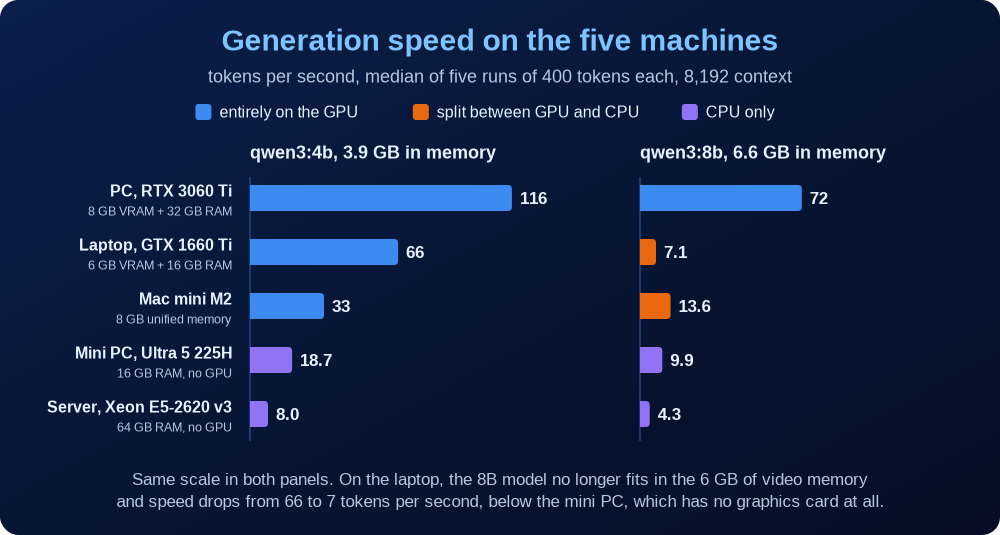
The speed of a local AI model depends first of all on where it fits. On a laptop with a 6 GB graphics card, Qwen3-4B generates 66 tokens per second, while Qwen3-8B, which no longer fits on the card, manages only 7. Without a graphics card, the pace is set by RAM, not by core count, and an MoE model is 3-7 times faster than a dense one of the same size. The NVIDIA driver's default setting cost us 16-32% of our speed, with no visible sign.
We have five computers in the office running Ollama: a PC with a 2015 processor and an RTX 3060 Ti graphics card, a gaming laptop, a Mac mini M2, an ASUS NUC mini PC and an HP server with a 2014 processor. None of them was bought for AI. We installed the same version of Ollama and the same model files on all of them, then gave them the same requests.
The main conclusion fits in one sentence: the speed of a local model is decided by where it fits, not by how new the computer is. The laptop, with a 6 GB graphics card, generates 66 tokens per second with a model that fits on the card and 7 with one that no longer does. The mini PC, which has no graphics card at all, beats it on the second model.
Along the way we also found three settings that change the numbers more than we expected. One of them was holding our test PC 16-32% below its speed, with no visible sign.
The article continues the series on MoE models and thinking mode. Here we look only at hardware: what fits, how fast it runs and which settings matter. Answer quality is the subject of a separate article.
The five machines
| Machine | Processor | Memory | Graphics card |
|---|---|---|---|
| PC | Intel i5-6600K, 4 cores | 2 × 16 GB DDR4-2400 | RTX 3060 Ti, 8 GB |
| ASUS ROG laptop | AMD Ryzen 5 4600H, 6 cores | 16 GB DDR4-2667, a single module | GTX 1660 Ti, 6 GB |
| Mac mini | Apple M2 | 8 GB, unified memory | integrated |
| ASUS NUC mini PC | Intel Core Ultra 5 225H, 14 cores | 2 × 8 GB DDR5-5600 | integrated, not used by Ollama |
| HP server | Intel Xeon E5-2620 v3, 6 cores | 64 GB DDR4-1866, two modules | none |
Each machine stands for a class of hardware a company already has around the office. The PC has a dedicated graphics card on an old platform. The laptop has a smaller card and a single memory module. The Mac has little memory, but all of it is available to the graphics processor. The mini PC and the server run the models on the processor only.
All of them run Ollama 0.40.17. We checked that the model files have the same digest on every machine, so we are comparing exactly the same weights. The context window was 8,192 tokens in every run.
For generation speed, we asked for 400 tokens each time, at temperature 0, five times in a row, and we report the median. For reading speed, we sent a text of about 1,850 tokens, different on every run, to get around the cache. The durations come from Ollama's response, so the network does not affect them. The measurement script and the raw results are public.
The models
| Model in Ollama | Type | Parameters, total / used per token | In memory |
|---|---|---|---|
granite3.1-moe:3b |
MoE | 3.3B / 0.8B | 2.7 GB |
qwen3:4b |
dense | 4.0B / all | 3.9 GB |
lfm2.5:8b-a1b |
MoE | 8.3B / 1.5B | 5.4 GB |
qwen3:8b |
dense | 8.2B / all | 6.6 GB |
gpt-oss:20b |
MoE | 21B / 3.6B | 14.0 GB |
| Qwen3-30B-A3B, 3-bit | MoE | 30.5B / 3.3B | 15.7 GB |
qwen3:30b, 4-bit |
MoE | 30.5B / 3.3B | 19.6 GB |
The “In memory” column is the size Ollama reports with the model loaded and an 8,192-token context, larger than the file on disk. It varies by a few hundred MB from one machine to another.
A dense model uses all its parameters for every token. An MoE (Mixture of Experts) model picks only some of them, as we explained in the article on Qwen3-30B-A3B. The figures come from the model cards: LFM2.5-8B-A1B, gpt-oss-20b and Granite 3.1 3B-A800M. The 3-bit version of Qwen3-30B-A3B does not exist in the Ollama library; we took it from Hugging Face, in Q3_K_M quantization. The others are quantized to 4 bits: Q4_K_M or, for gpt-oss:20b, MXFP4.
Generation speed
Tokens per second, median of the runs:
| Model | PC | Laptop | Mac mini | Mini PC | Server |
|---|---|---|---|---|---|
granite3.1-moe:3b |
229 | 167 | 91 | 65 | 26 |
qwen3:4b |
116 | 66 | 33 | 18.7 | 8.0 |
lfm2.5:8b-a1b |
210 | 52 | 52 | 43 | 18.5 |
qwen3:8b |
72 | 7.1 | 13.6 | 9.9 | 4.3 |
gpt-oss:20b |
18.3 | 9.0 | does not fit | 14.3 | 5.6 |
| Qwen3-30B-A3B, 3-bit | 23.6 | 12.2 | does not fit | 10.4 | not measured |
qwen3:30b, 4-bit |
18.0 | stalled | does not fit | does not fit | 9.3 |
Three things show in the table before any explanation:
- The PC wins by a wide margin only as long as the model fits in the card's 8 GB. For models over 14 GB, its lead over the mini PC shrinks from seven times to 1.3-2.3 times.
- The laptop has the biggest drop: from 66 to 7.1 tokens per second between two models of the same family.
- The server with 64 GB comes last in almost everything, but it is the only machine besides the PC that can hold the 19.6 GB model.
Fitting on the card, or not
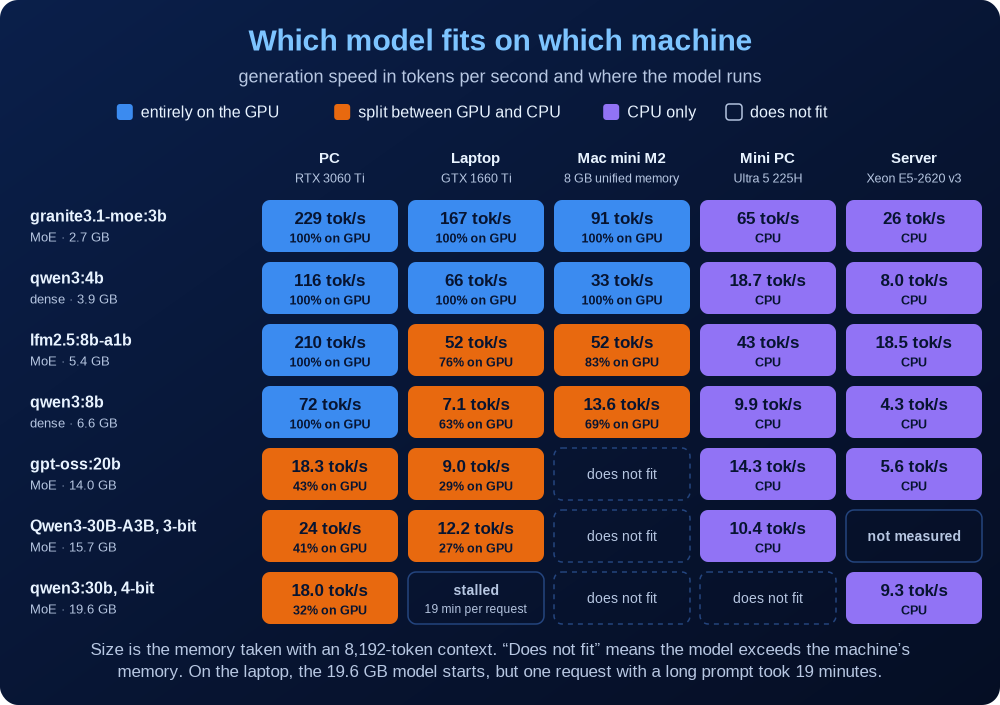
Ollama puts as many of the model's layers on the graphics card as will fit and leaves the rest on the processor. The ollama ps command shows the split. As long as everything stays on the card, the laptop with the GTX 1660 Ti reaches more than half the PC's speed: 66 versus 116 tokens per second with qwen3:4b.
With qwen3:8b, only 63% of the model fits in the card's 6 GB. The rest runs on the processor, which reads the weights from a single memory module. The slow part sets the pace for the whole model, and speed drops to 7.1 tokens per second. The mini PC, with no graphics card at all, does 9.9.
A model split between graphics card and processor can be slower than the same model run on a processor alone with fast memory. The laptop is also paying here for its single memory module, which we wrote about for the NUC 15 Pro in a separate article.
On the Mac mini, the 8 GB are shared with the operating system. qwen3:4b fits entirely and runs steadily, at 32.8-33.0 tokens per second in every run. qwen3:8b fits only 69%, and its speed varies from run to run between 12.9 and 15.8.
The extreme case is qwen3:30b on the laptop. The model is 19.6 GB, and the laptop has 6 GB on the card and 16 GB of RAM. It loaded in 247 seconds. The first generation ran at 2.6 tokens per second, the second, with the same request, at 7.9. A single request, with a 1,844-token prompt, took 19 minutes and 22 seconds. Throughout, the disk was 100% busy and memory 96% used: the system was moving chunks of the model between RAM and disk. The model starts, but it is not usable.
The context window matters only where it moves layers between card and processor:
qwen3:8b |
Context 4,096 | Context 8,192 |
|---|---|---|
| PC, entirely on the card | 71.9 | 71.9 |
| Mini PC, on the processor | 9.6 | 9.9 |
| Laptop | 8.4, with 70% on the card | 7.1, with 63% on the card |
| Mac mini | 15.4, with 76% on the card | 13.6, with 69% on the card |
Without a graphics card, memory sets the pace
The mini PC and the server run everything on the processor. For every token, the processor reads almost the whole model from RAM, so memory speed matters more than core count.
The mini PC has two DDR5-5600 modules, with a theoretical bandwidth of 89.6 GB/s. The server has DDR4-1866 on two channels, around 30 GB/s, also in theory. Its processor supports four channels, but only two modules are installed. With qwen3:8b, the mini PC generates 9.9 tokens per second and the server 4.3.
We also checked this directly, by changing the number of threads, with two runs for each value:
| Threads | Mini PC, generation | Mini PC, prompt reading | Server, generation |
|---|---|---|---|
| 4 | 8.3 | 46 | not measured |
| 6 | 9.6 | 53 | 4.4 |
| default | 10.0 | 56 | 4.5 |
| 8 | 10.2 | 60 | not measured |
| 12 | 11.2 | 75 | 4.2 |
| 14 | 10.6 | 72 | not measured |
On the server, doubling the threads changes nothing. Its limit is memory: we would expect two more modules, on the free channels, to bring it more than any new processor, but we did not measure that.
On the mini PC, going from 4 to 12 threads raises generation speed by only 35%. The Core Ultra 5 225H has 4 performance cores, 8 efficiency cores and 2 low-power cores, and the first four do almost all the work.
MoE models change the ranking
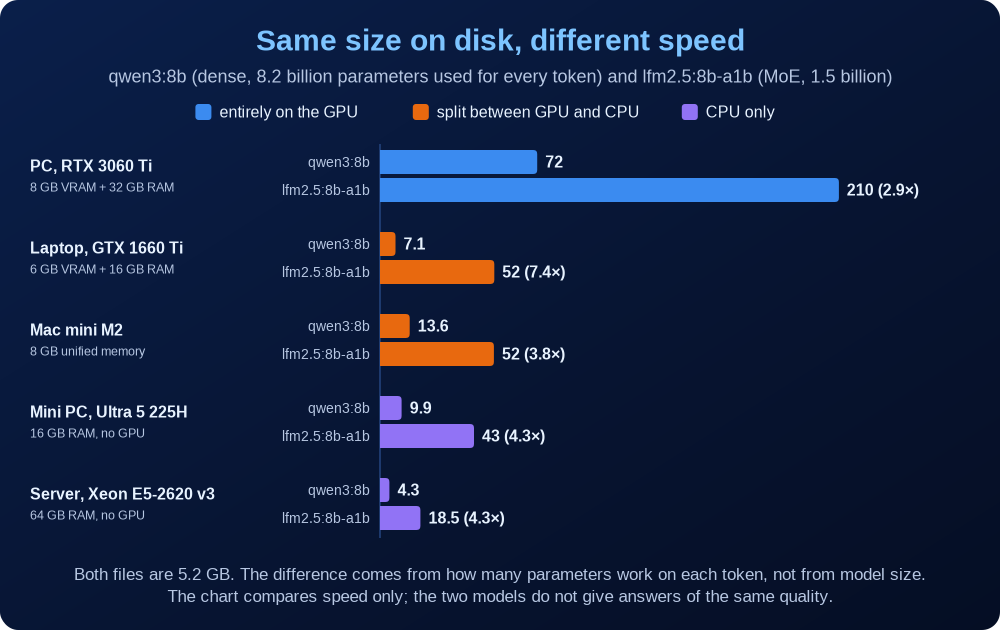
lfm2.5:8b-a1b and qwen3:8b have files of the same size, 5.2 GB. The first is an MoE model and uses 1.5 billion parameters for every token. The second uses all 8.2 billion. The speed difference is 2.9 times on the PC and 4.3 times on the machines with no graphics card.
The same effect shows with the large models. On the server, qwen3:30b generates 9.3 tokens per second, twice as fast as qwen3:8b, which is three times smaller. On the mini PC, gpt-oss:20b does 14.3, above the 9.9 of qwen3:8b.
On a machine with plenty of memory and no graphics card, the large MoE model is also the faster choice. There is one exception we cannot explain: on the server, gpt-oss:20b runs at 5.6 tokens per second, below qwen3:30b, even though it is smaller.
Speed says nothing about quality. In our quality tests, the fastest model in this table was not also the best.
Reading the prompt
Before writing its first word, the model reads everything you sent it: the question, the instructions, the pasted document. Here the graphics card has no competition.
Machine, qwen3:8b |
Reading, tokens/s | Wait for 1,850 tokens |
|---|---|---|
| PC | 2,561 | under 1 s |
| Laptop | 126 | 15 s |
| Mac mini | 115 | 16 s |
| Mini PC | 57 | 33 s |
| Server | 22.6 | 82 s |
The last column is calculated from the measured speed. Our 1,850-token text, in Romanian, has about 4,500 characters, a page and a half. On the server you wait almost a minute and a half for the first word of the answer, and then the text flows at 4.3 tokens per second.
For an assistant that answers from documents, reading speed often matters more than generation speed. MoE models help here too, but less: on the mini PC, lfm2.5:8b-a1b reads at 193 tokens per second.
The NVIDIA driver: half the clock, with no sign
When we redid the measurements from the earlier articles on the PC, qwen3:8b came out at 60 tokens per second instead of 72. The card showed 95% utilization and 45 °C.
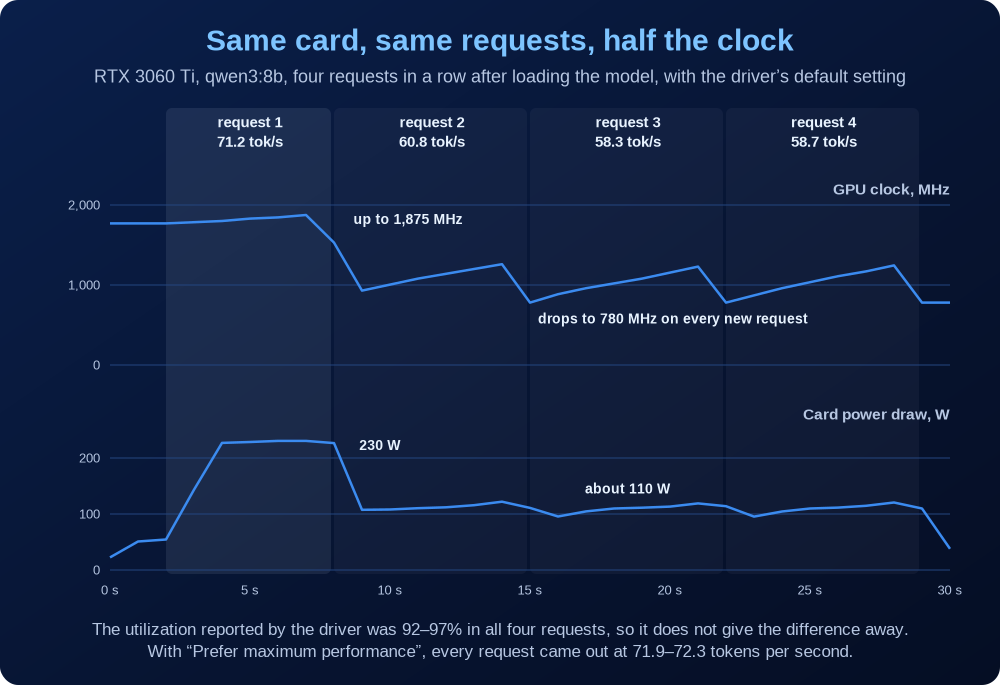
The nvidia-smi log showed the cause. The first request after loading the model ran with the card at 1,785-1,875 MHz and 230 W. On each following request, the clock dropped to 780 MHz and then climbed slowly, by about 75 MHz per second. A seven-second request ended with the card at only 1,250-1,400 MHz.
This is the driver's power-saving behavior. NVIDIA's documentation describes it under the “Adaptive” option: the driver reduces the card's performance according to the application's needs. For a game, that is a good choice. For a language model, which works in short bursts, it means the card never gets to speed up. We did not note which option was selected before; we only know it was not “Prefer maximum performance”.
| Model, on the PC | Setting as found | Prefer maximum performance |
|---|---|---|
qwen3:4b, generation |
79.5 | 116.4 |
qwen3:8b, generation |
60.7 | 71.9 |
qwen3:8b, prompt reading |
1,434 | 2,561 |
qwen3:30b, generation |
18.2 | 18.0 |
The 30B model gains nothing, because only a third of it sits on the card. The “Best performance” power plan in Windows does not control this setting; you change it in the NVIDIA Control Panel, under Manage 3D settings, Power management mode.
The figures in our earlier articles reproduce only with “Prefer maximum performance”: 72.8 tokens per second now, versus 72.7 in October. We do not know when the setting changed; a driver update is the most plausible explanation, but we have not proven it.
The setting has a price. At the reduced clock, the card drew around 110 W and stayed at 48-52 °C. At full clock it draws 230 W, and in long runs it reached 70 °C. For 18% more speed with qwen3:8b, the card's power draw doubles. On the laptop with the GTX 1660 Ti, the same change brought nothing: 65.8 versus 66.8 tokens per second.
Integrated graphics and the NPU: why Ollama ignores them
The mini PC has Intel Arc 130T integrated graphics and an NPU. Ollama used neither. Its log says why:
dropping integrated GPU; to enable, set OLLAMA_IGPU_ENABLE=1
We enabled the variable and repeated the measurements. The models loaded onto the Arc 130T, but four out of five failed during generation. qwen3:8b started the essay correctly, then, after a few sentences, wrote nothing but commas until Ollama stopped it with “token repeat limit reached”. On the processor, the same model wrote the same essay to the end, in every run.
The only model that worked on the integrated graphics was gpt-oss:20b: it read the prompt faster, at 92 tokens per second instead of 59, but generated more slowly, at 10.1 instead of 14.3.
On this machine, Ollama's default choice is the right one. The result holds for the Arc 130T with Ollama 0.40.17; we do not know whether the driver or Ollama's Vulkan support is to blame. The NPU does not show up in detection at all: Ollama's documentation lists only NVIDIA and AMD cards, Metal on Apple, and Vulkan.
One measurement trap, on the same machine: Task Manager showed 1.33 GHz under full load. HWiNFO showed the cores at 3.7-4.3 GHz. On hybrid processors, the figure in Task Manager is not proof that the processor is being throttled.
3-bit quantization brings the large model to the smaller machines
The usual version of Qwen3-30B-A3B keeps its weights at about 4 bits and takes 19.6 GB in memory. The 3-bit version takes 15.7 GB.
| Machine | 4-bit, 19.6 GB | 3-bit, 15.7 GB |
|---|---|---|
| PC | 18.0, with 32% on the card | 23.6, with 41% on the card |
| Laptop | stalled | 12.2, with 27% on the card |
| Mini PC | does not fit | 10.4, on the processor |
| Server | 9.3 | not measured |
We measured the Instruct variant at 3 bits and the Thinking variant at 4 bits; they have the same architecture. The 4 GB saved bring the model to two more machines and speed it up by 30% on the PC. On the laptop, one run broke off once with a connection error and worked on retry; 15.7 GB is close to its limit.
Compression has a quality cost. In a test where the models write PowerShell scripts, the 4-bit version wrote 11 correct scripts out of 12, and the 3-bit version only 5. The test is described in the article on scripts.
How to check on your own computer
- Ask the model a question, then run
ollama ps. ThePROCESSORcolumn shows100% GPU,100% CPUor the split. If you see a split, try a smaller model or a smaller context. - Run
ollama run qwen3:8b --verboseand ask the same question three times. At the end you getprompt eval rateandeval rate. If the first run is noticeably faster than the following ones, go to step 3. - On an NVIDIA card, start
nvidia-smi --query-gpu=power.draw,clocks.current.graphics --format=csv -l 1in a terminal and generate something. If the clock drops on every new request, change Power management mode to “Prefer maximum performance” and measure again. - Without a graphics card, check the memory: in Task Manager, under Performance, Memory, look for “Slots used”. A single module means half the possible speed.
- On a processor with performance and efficiency cores, try
/set parameter num_thread 12in the session, using your own count of performance and efficiency cores, and compareeval rate. - Disable sleep on the machine serving the model. Our mini PC fell asleep in the middle of a run and stayed unresponsive for ten minutes.
Where it does not fit
- One unit of each class. Another laptop with the same card but two memory modules will give different figures for the split models.
- A single user. We sent the requests one at a time. With several people at once, the figures drop, and we did not measure by how much.
- Speed, not quality. A model that does 229 tokens per second and answers wrong helps nobody.
- A Mac with 8 GB. On a Mac with 16 or 24 GB, the 8B models would fit entirely. We do not have one, so we have no figures.
- Power at the wall. We measured only the PC's graphics card power, from
nvidia-smi. We have no total power figure for any machine. - One unexplained figure. On the laptop,
qwen3:4breads the prompt at only 247 tokens per second, even though it sits entirely on the card. The PC does 4,621.
How we do it
Both Brio Argus, the assistant that answers from a company's internal documents, and Brio Nyx, the document anonymization application, use local models through Ollama. Argus can work with several Ollama instances, on processor or graphics card, and has a benchmark between models. Nyx needs a server with a graphics card.
Before any hardware recommendation, we run these measurements on the client's machine, with their documents. Often, the useful question is not which computer to buy, but which model fits well on the one you already have. Sometimes the answer is a second memory module or a driver setting.
If you want to run a local AI model and do not know whether your hardware is enough, send us its configuration: the processor, the memory, with the number of modules, and the graphics card. We will tell you which model fits and what speed to expect, before you buy anything.
Frequently asked questions
What graphics card do I need for a local AI model with Ollama?
One the model fits on entirely, context included. On a 6 GB card, a 3.9 GB model generated 66 tokens per second, while a 6.6 GB one, of which only 63% fit, generated 7.1. On an 8 GB card, the same model fit entirely and did 72. Check the split with ollama ps.
Can I run a local AI model without a graphics card?
Yes. On a mini PC with a Core Ultra 5 225H and two DDR5-5600 modules we measured 18.7 tokens per second with Qwen3-4B, 9.9 with Qwen3-8B and 43 with LFM2.5-8B-A1B, an MoE model. The slow part is reading the prompt: a page and a half of text means over 30 seconds of waiting with Qwen3-8B.
Why is Ollama slower than it should be on an NVIDIA card?
One cause we ran into is the driver's adaptive power mode. The card reports 95% utilization, but its clock drops on every new request. For us, Qwen3-8B ran at 60.7 tokens per second instead of 71.9. The “Prefer maximum performance” setting in the NVIDIA Control Panel fixed it, at the cost of doubling the card's power draw.
Does Ollama use Intel integrated graphics or the NPU?
Not by default. Ollama detects the integrated graphics and excludes it, and the NPU is not supported. We forced it on with OLLAMA_IGPU_ENABLE=1 on a mini PC with Intel Arc 130T: four models out of five produced garbled text after a correct start, and the fifth generated more slowly than on the processor.
Is a Mac mini with 8 GB enough for a local model?
For a 4B-class model, yes: Qwen3-4B generated a steady 33 tokens per second. Qwen3-8B no longer fits entirely and varied between 12.9 and 15.8. An MoE model of the same size, LFM2.5-8B-A1B, did 52 tokens per second, but speed does not guarantee answer quality.


