MoE models: how a 30B LLM runs on a PC with 8 GB of VRAM
What a Mixture of Experts model is, how Qwen3-30B-A3B is built from 128 experts per layer, and the speed we measured on a PC with an RTX 3060 Ti and 32 GB of RAM.

In short
An MoE model replaces the dense MLP in each layer with many small experts and a router that picks a few of them for every token. Qwen3-30B-A3B has 30.5 billion parameters but uses only 3.3 billion per token: it needs the memory of a 30B model, while its compute and speed are those of a 3B one. On a PC with an i5-6600K, 32 GB of DDR4 and an 8 GB RTX 3060 Ti, where the model does not fit on the card, we measured 19.4 tokens per second, against 52.6 for Qwen3-8B running entirely on the card.
An office PC from 2015: an Intel i5-6600K processor, 32 GB of DDR4 RAM and an RTX 3060 Ti graphics card with 8 GB of memory. On it we ran, through Ollama, a language model with 30 billion parameters, whose file is 19 GB and does not fit on the graphics card. It generated text at 19.4 tokens per second, faster than you can read. The same PC runs Qwen3-8B, a model almost four times smaller, at 52.6 tokens per second.
The model is called Qwen3-30B-A3B. The letter “A” in the name is the whole explanation: of its 30 billion parameters, only 3 billion are used for each token. A Mixture of Experts model needs the memory of a large model, but does the compute of a small one, and therefore runs at a small one's speed. The rest of the article shows how that works and what it costs.
In the previous article we followed a token through the 36 layers of Qwen3-8B, a “dense” model: all of its numbers take part in every token. Here we change a single block in that layer. The math stays at high-school level, and the figures come from the model's configuration file, from the Qwen3 technical report and from our own measurements, which we report exactly as they came out, including a reasoning loop that never ended.
What “30B-A3B” means
| Characteristic | Qwen3-30B-A3B | Qwen3-8B, for comparison |
|---|---|---|
| Stored parameters | 30.5 billion | 8.19 billion |
| Parameters used per token | 3.3 billion | 8.19 billion |
| Layers | 48 | 36 |
| Internal vector size | 2,048 | 4,096 |
| Attention heads (queries / keys-values) | 32 / 4 | 32 / 8 |
| Experts per layer / active per token | 128 / 8 | no experts |
| Inner size of one expert | 768 | dense MLP of 12,288 |
| Native context | 262,144 tokens (2507 version) | 32,768 |
| The file in Ollama (Q4_K_M) | 19 GB | 5.2 GB |
Sources: the Qwen3-30B-A3B model card, the configuration file and the qwen3:30b page in Ollama. Note that the internal vector is half the size of the 8B's, while there are more layers. The model is “narrower and deeper”, and its bulk sits in the experts.
The MoE layer: what replaces the MLP
In the dense layer, attention is followed by the MLP: three 4,096 × 12,288 matrices that every token passes through, without exception. In Qwen3-8B, the MLP's 151 million numbers make up three quarters of the layer.
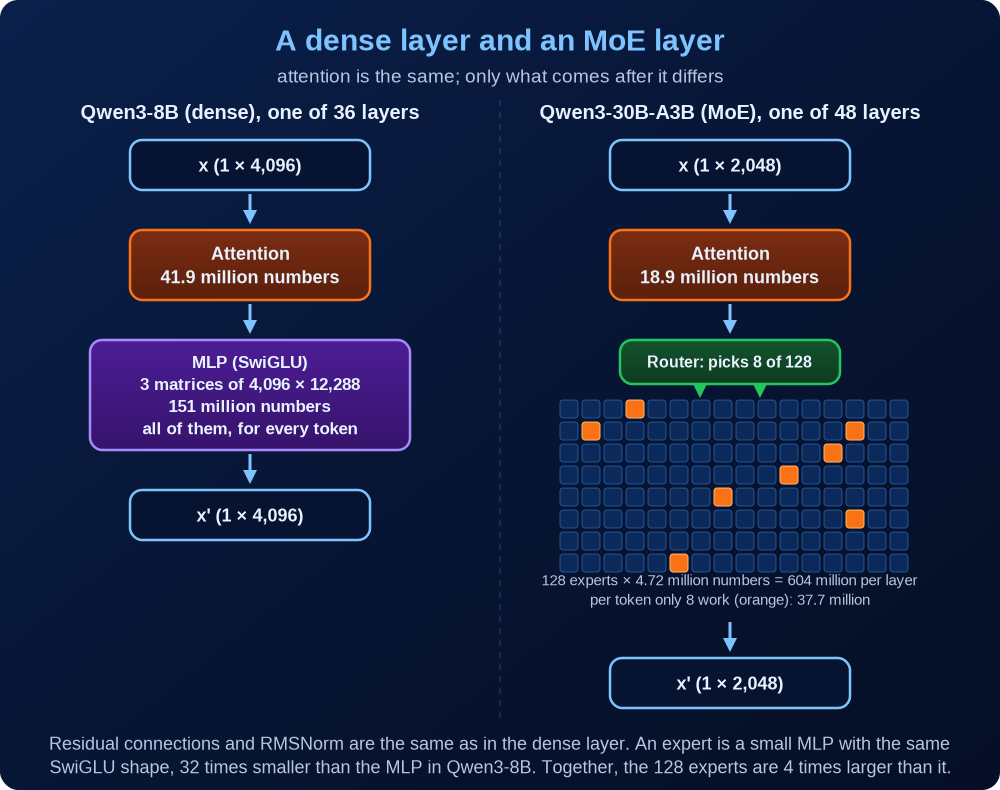
In an MoE layer, the single large MLP is replaced by 128 small MLPs, called experts, and a router. For each token, the router picks 8 experts. Only those compute; the other 120 are not even read from memory for that token. The idea is more than three decades old, but it became practical for language models through Shazeer et al., 2017 and the Switch Transformer, 2021. It then reached public models with Mixtral, with 8 experts of which 2 are active, and very large ones with DeepSeek-V3, with 671 billion parameters of which 37 billion are active.
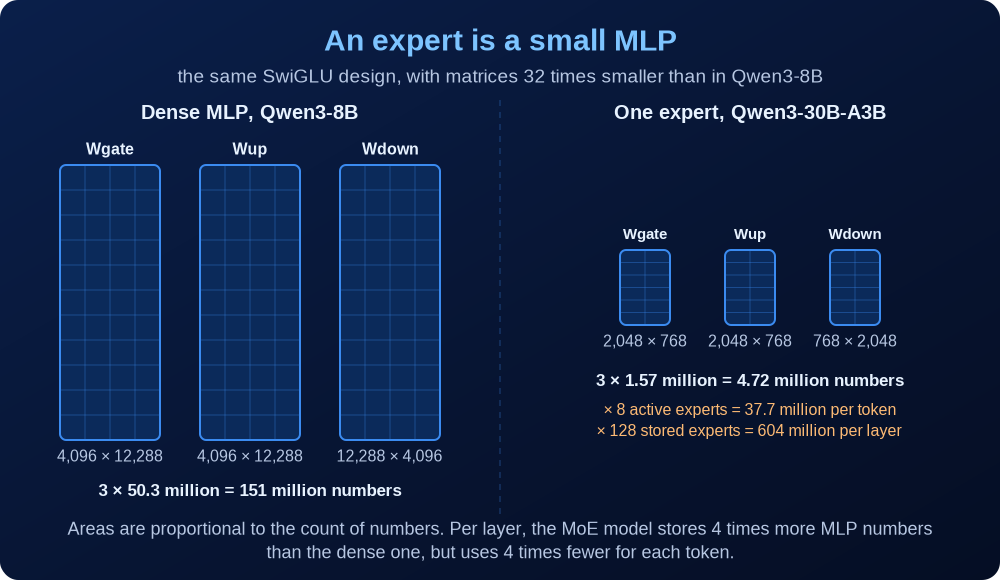
An expert in Qwen3-30B-A3B is built exactly like the MLP described in the previous article: a “gate” matrix and a widening matrix, 2,048 × 768 each, a SiLU function, an element-wise multiplication and a down-projection matrix of 768 × 2,048. In total, 4.72 million numbers, 32 times fewer than the MLP in the 8B. But there are 128 experts per layer, so the layer stores 604 million MLP numbers, 4 times more than the dense one.
The router, step by step
The router is the smallest piece in the model, and the one that makes all the difference.
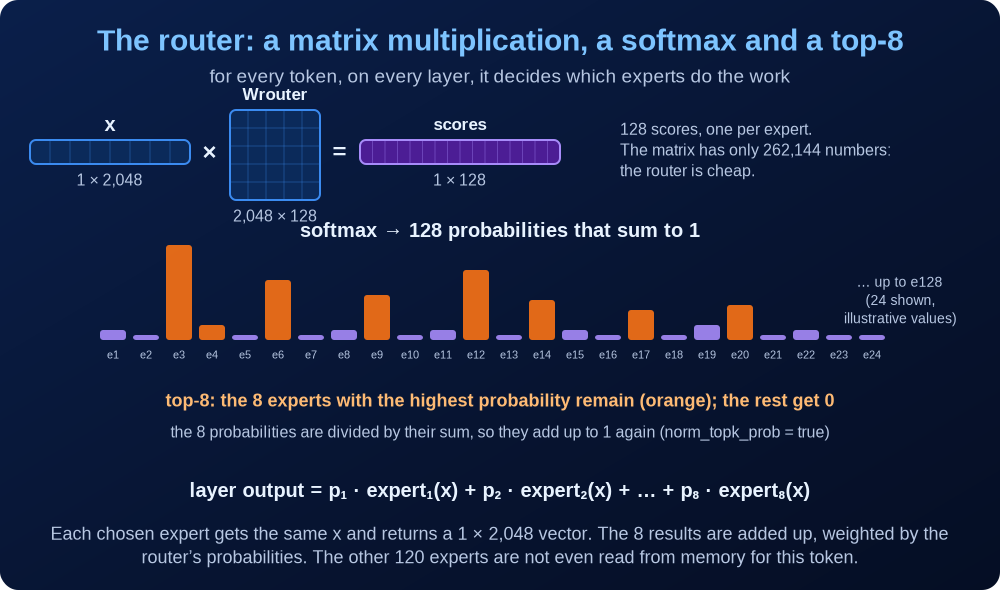
- A matrix multiplication. The token's vector, 1 × 2,048, is multiplied by the router matrix, 2,048 × 128. The result is 128 scores, one for each expert. The matrix has only 262,144 numbers, so this step is almost free.
- Softmax. The scores become positive probabilities that sum to 1, through the same normalized exponential we used for attention.
- Top-8. The 8 experts with the highest probability are kept. Their 8 probabilities are divided by their sum, so they add up to 1 again; in the configuration, this detail appears as
norm_topk_prob: true. - The experts do their work. Each of the 8 receives the same vector x and returns a 1 × 2,048 vector.
- The weighted sum. The layer's output is
p₁ · expert₁(x) + … + p₈ · expert₈(x), with the p values from step 3. It is added to the input vector through the residual connection, exactly as in the dense layer.
Step 3 is the one that does not exist in the dense layer and that makes the model “sparse”: a discrete decision, taken separately for each token and each layer.
The parameter inventory: 30.5 billion stored, 3.3 billion used
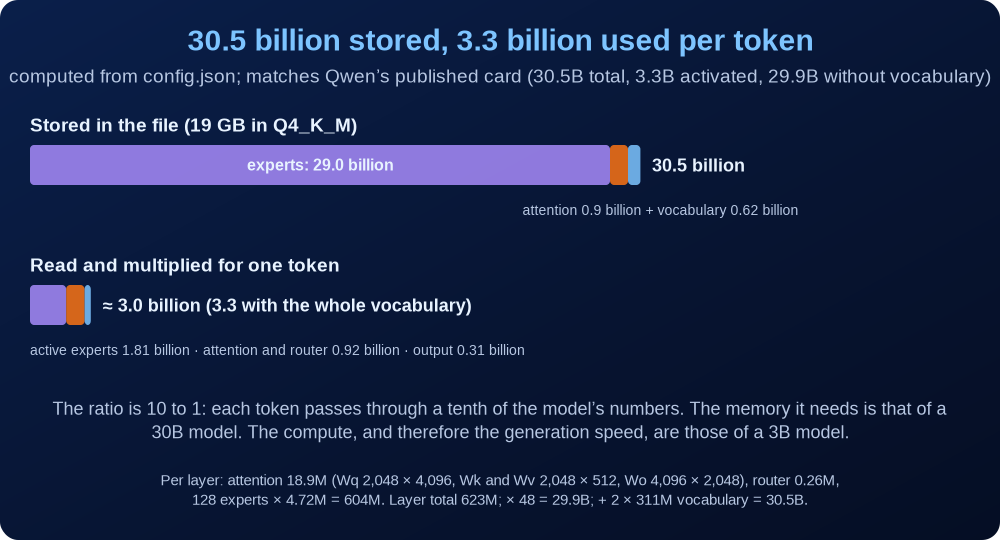
The calculation below starts from the configuration file and matches the figures published by Qwen: 30.5 billion in total, 29.9 billion without the vocabulary, 3.3 billion activated.
| Matrix, per layer | Size | Numbers | Per token |
|---|---|---|---|
| Wq | 2,048 × 4,096 | 8.39 million | all |
| Wk | 2,048 × 512 | 1.05 million | all |
| Wv | 2,048 × 512 | 1.05 million | all |
| Wo | 4,096 × 2,048 | 8.39 million | all |
| Router | 2,048 × 128 | 0.26 million | all |
| One expert (3 matrices) | 2,048 × 768 each | 4.72 million | only if chosen |
| 128 experts | 604 million | 8 of 128: 37.7 million | |
| Layer total | 623 million | 56.9 million |
Multiplied by 48 layers: 29.9 billion stored, 2.73 billion used per token. The two vocabulary matrices, 151,936 × 2,048 each, add 0.62 billion to storage; at run time, the output matrix of 0.31 billion is read in full for every token. That gives the roughly 10-to-1 ratio between what sits in the file and what does the work.
Token by token: who picks and what the experts do
Experts are chosen for each token separately, on each layer separately. The token “Explain” may use experts 3, 17, 29 and five others on layer 10, and the next token entirely different ones. Across 48 layers, a single token activates 384 of the model's 6,144 experts.
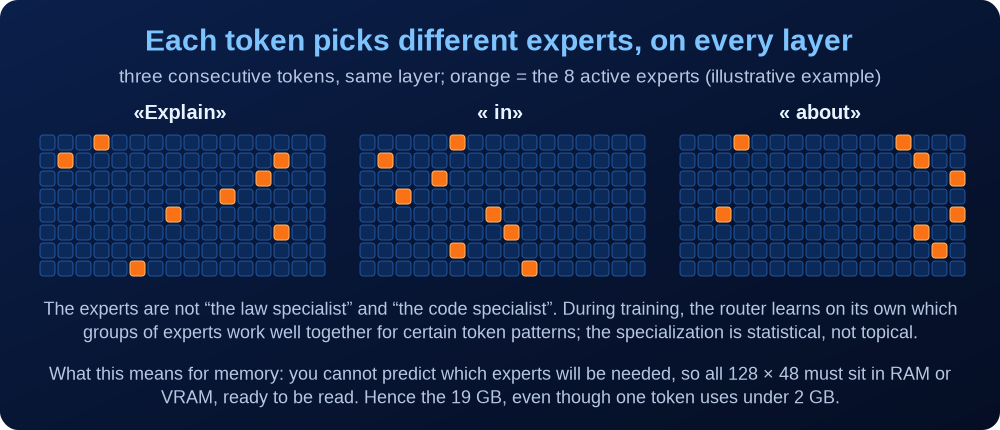
Two practical consequences are worth remembering. First: the experts are not subject specialists. There is no “law expert” and no “code expert”. During training, the router learns, statistically, which groups of experts work well together for certain token patterns, and the Qwen3 report only says that global-batch balancing “encourages specialization”, without describing it by topic. Second: because you cannot know in advance which experts will be called on, all 6,144 have to sit in memory, ready to be read. Hence the 19 GB.
Load balancing: why the model degrades without it
The router has a structural weakness. If a few experts are slightly better at the start of training, they receive more tokens, learn more, get even better and receive ever more tokens. The others stop receiving anything and stay untrained. The model ends up effectively using 3-4 experts out of a hundred, so it behaves like a much smaller model while taking up the same memory.
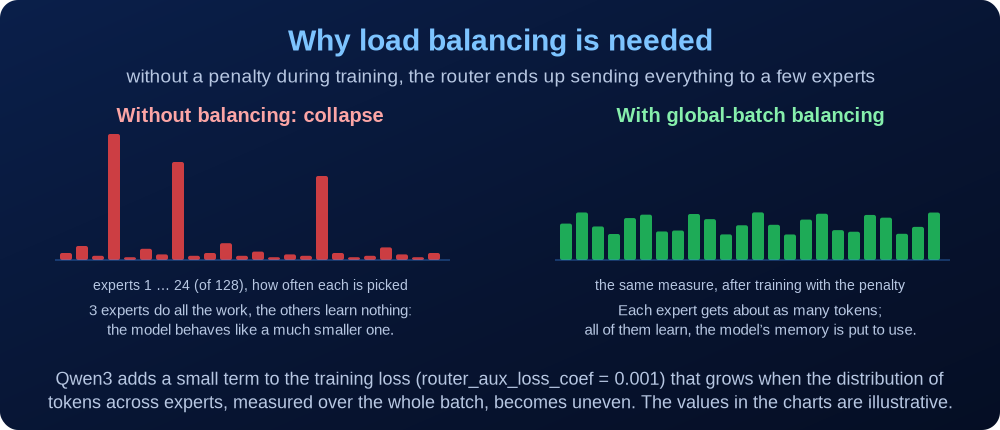
The fix is an extra term in the training loss, which grows when the distribution of tokens across experts becomes uneven. Qwen3 applies it over the whole training batch, not per sequence, with a small coefficient (router_aux_loss_coef: 0.001). Other models chose differently: DeepSeek-V3 uses a strategy without an auxiliary term, while Mixtral relies on a classic balancing term. The user never sees this detail, but it explains why you cannot take a dense model and “slice” it into experts after training.
How it was trained
Qwen3-30B-A3B went through the same pre-training as the dense models in the family, described in the previous article: roughly 36 trillion tokens in three stages. The technical report states that, on the same data, the MoE base models reach performance similar to the dense ones with a fifth of the activated parameters, and that 30B-A3B-Base is comparable to Qwen3-14B-Base and Qwen2.5-32B-Base, with 11 times fewer activated parameters than the latter.
Post-training is, as for the 8B, “strong-to-weak” distillation: 30B-A3B is the only MoE in the list of models obtained this way, with Qwen3-32B and Qwen3-235B-A22B as teachers. In July 2025, Qwen published two updated versions, labeled “2507”: Instruct, which never thinks, and Thinking, which always thinks, both with a native context of 262,144 tokens. The original hybrid model, which switched between the two modes, remains available separately. The distinction matters a lot in practice, as the measurements will show.
Unlike Qwen2.5-MoE, Qwen3 has no “shared experts”, that is, experts that every token passes through; all 128 are chosen by the router.
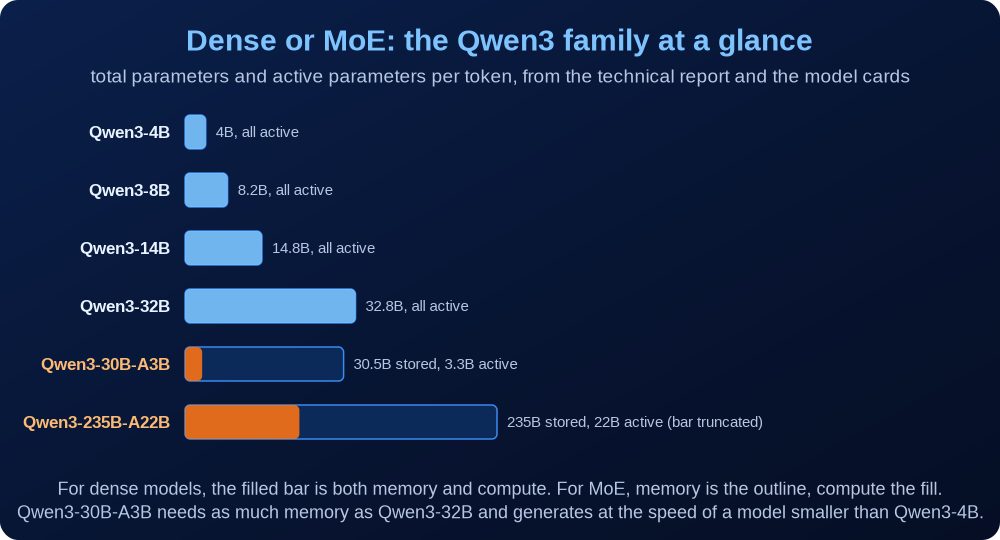
Memory versus compute
Now we can put together what matters for an office PC. In the previous article we showed that generation speed is limited by memory: for every token, the weights in use must be read from RAM or VRAM. For a dense model, the whole file is read. For an MoE, only the attention, the routers, the output matrix and the 8 experts chosen on each layer are read.
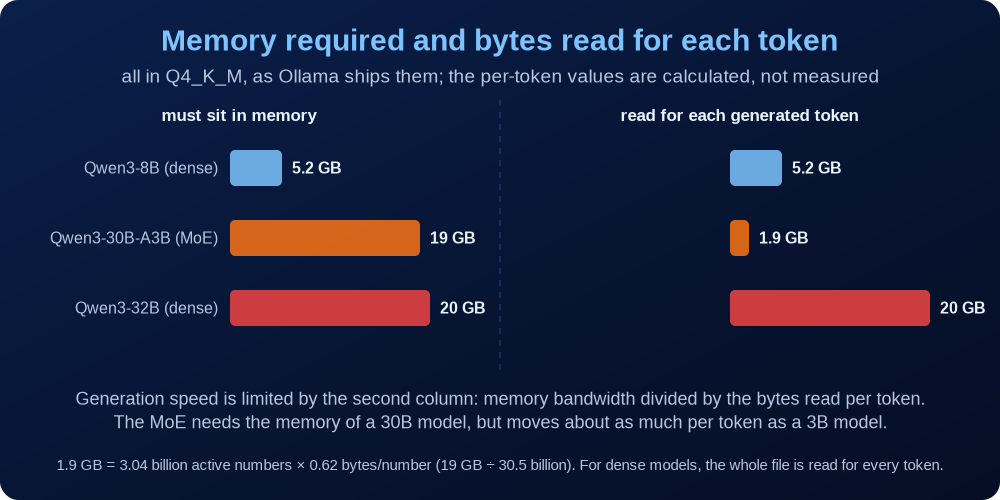
| Model, Q4_K_M | Must sit in memory | Read per token | Theoretical ceiling at 38.4 GB/s |
|---|---|---|---|
| Qwen3-8B (dense) | 5.2 GB | 5.2 GB | 7.4 tokens/s |
| Qwen3-30B-A3B (MoE) | 19 GB | 1.9 GB | 20 tokens/s |
| Qwen3-32B (dense) | 20 GB | 20 GB | 1.9 tokens/s |
The “per token” column is calculated: 3.04 billion active numbers times 0.62 bytes per number, the average in the 19 GB file. The last column assumes the whole model sits in the system RAM of our machine, with two DDR4-2400 modules in dual-channel, so 38.4 GB/s in theory. On such a machine, with no graphics card, the 30B MoE would be almost three times faster than the dense 8B model and ten times faster than the dense 32B. With a single RAM module, all these figures halve, as we explained for the NUC 15 Pro in a separate article.
What we measured: i5-6600K, 32 GB DDR4, RTX 3060 Ti
The test machine is a real office PC, not a configuration chosen for the article: an Intel i5-6600K with 4 cores, 2 × 16 GB DDR4-2400, an RTX 3060 Ti with 8 GB of VRAM, Windows, and Ollama with the default 4,096-token context window. The prompt was the same every time: “Explică în aproximativ 200 de cuvinte ce este un reverse proxy.” (Romanian for “Explain in about 200 words what a reverse proxy is.”)
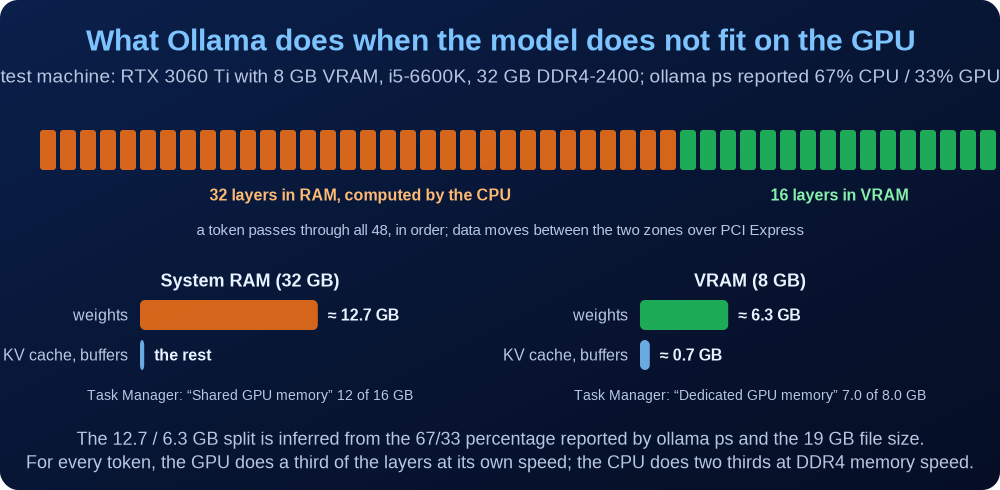
With 8 GB of VRAM, Ollama put a third of the layers on the card and two thirds in RAM: ollama ps reported 67%/33% CPU/GPU, and Task Manager showed 7.0 of 8.0 GB of dedicated memory and 12 of 16 GB of “shared GPU memory”, that is, system RAM used for the rest of the model.
| Measurement | qwen3:8b, 100% GPU | qwen3:30b, 67% CPU / 33% GPU |
|---|---|---|
| Loading from disk | 18.1 s | 52.3 s |
| Prompt tokens | 36 | 30 |
| Prompt reading | 130.2 tokens/s | 32.4 tokens/s |
| Tokens generated | 275 | 2,709 |
| Generation | 52.6 tokens/s | 19.4 tokens/s |
| Total duration | 23.6 s | 3 min 13 s |
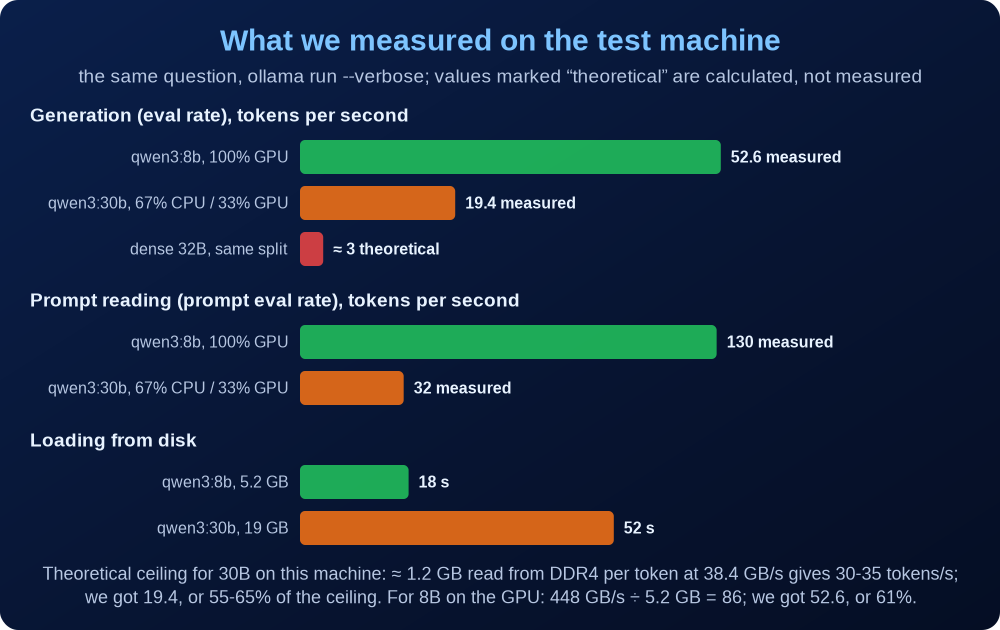
Four observations:
- Generation speed confirms the calculation. With two thirds of the layers in RAM, one token reads around 1.2 GB from DDR4; at 38.4 GB/s, the ceiling is 30-35 tokens/s, and the model reached 19.4, or 55-65% of it. The rest is lost to synchronization between the card and the processor, and to the processor not reaching the theoretical bandwidth. A dense 32B model with the same split would have had a ceiling of 2.9 tokens/s. For the 8B, entirely on the card, the ceiling is 448 GB/s ÷ 5.2 GB = 86 tokens/s, and the model reached 52.6, or 61%.
- Prompt reading is the weak spot. On the card, the 8B reads 130 tokens/s. The 30B, with two thirds of its layers on a 4-core processor from 2015, manages only 32. With a 4,000-token document pasted into the prompt, you would wait two minutes for the first word of the answer. Prefill is limited by compute, not memory, and there the MoE does not help as much.
- Loading from disk takes 52 seconds for 19 GB. Ollama keeps the model in memory for 5 minutes after the last answer; for an assistant used only now and then, it is worth raising
keep_alive. - The 2,709 tokens generated for an answer of “about 200 words” are not a measurement error. The model thought before answering, even though we had run it with
--think=false. The explanation is in the next section.
There is one more run to report, the first on the 30B, in the default mode. The model started thinking, tried to fit the answer into 200 words, switched to English, put the answer in a LaTeX \boxed{} block, the way math training data does, then repeated variations of the sentence “This is the final answer. The response is complete.” without end. We had to stop it, so we have no statistics for that run. The model card warns about “endless repetitions” and recommends a presence_penalty between 0 and 2, while Ollama ships qwen3 with repeat_penalty: 1, meaning no penalty at all. A length constraint plus thinking mode were enough to trigger the loop.
Three models under one name
Ollama publishes several variants of Qwen3-30B-A3B under different tags, and the short tag does not tell you which one you get. We checked the tags page: qwen3:30b has the digest ad815644918f, the same as qwen3:30b-a3b-thinking-2507-q4_K_M. So what we ran is the Thinking-2507 variant, a model that, according to its card, “supports only thinking mode”. That is why --think=false had no effect, and why the answer ran to 2,709 tokens.
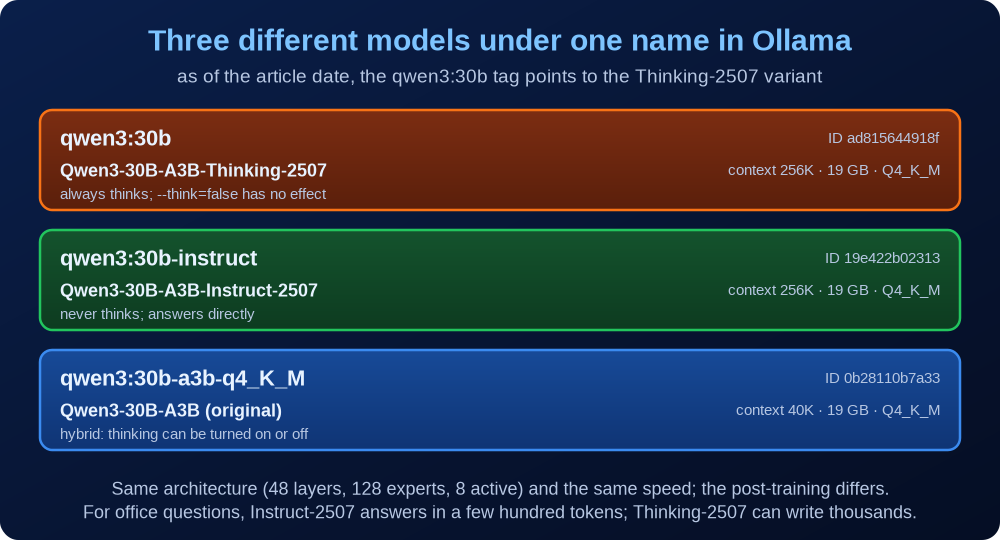
| Tag in Ollama | Model | Thinking | Context | Answer length recommended by Qwen |
|---|---|---|---|---|
qwen3:30b |
Thinking-2507 | always | 256K | up to 32,768 tokens |
qwen3:30b-instruct |
Instruct-2507 | never | 256K | up to 16,384 tokens |
qwen3:30b-a3b-q4_K_M |
the original hybrid | switchable | 40K | 32,768 with thinking |
For an office assistant that summarizes emails, answers from documents or fills in forms, the Instruct variant is the natural choice: it answers directly, in a few hundred tokens, at the temperature of 0.7 that Qwen recommends. The Thinking variant is for problems where it is worth waiting a few minutes for a better answer. Tags can change over time, so checking the digest remains the only reliable method.
How to check on your own computer
- Run
ollama pull qwen3:30b-instructif you want the variant without thinking, orollama pull qwen3:30bfor the one with thinking. Each downloads 19 GB. - Run
ollama show qwen3:30b-instruct. TheModelsection shows theqwen3moearchitecture,30.5Bparameters, theQ4_K_Mquantization and the context length. - Ask a question with
ollama run qwen3:30b-instruct --verboseand readprompt eval rateandeval rateat the end. The first run includes the warm-up; the second, with the model already loaded, gives the real figures. - In a second terminal, within 5 minutes,
ollama psshows thePROCESSORcolumn:100% GPU,100% CPUor the split percentage. With 8 GB of VRAM, expect about a third on the card; with 16 GB, about two thirds; with 24 GB, the whole model fits. - If the answers start repeating, set
/set parameter presence_penalty 1.5in the session, orpresence_penaltyin the API options, as Qwen recommends, and check again. - For long documents, enlarge the window with
/set parameter num_ctx 16384. This model's KV cache is small, 96 KB per token, thanks to its 4 key-value heads: 16,384 tokens mean about 1.5 GB extra.
Where it does not fit
- Under 32 GB of RAM. The 19 GB file plus the KV cache, buffers and the operating system do not fit in 16 GB. A laptop with 16 GB runs the 8B, not the 30B-A3B, however fast the MoE looks on paper.
- Quality per answer is not that of a dense 32B model. The Qwen3 report compares 30B-A3B-Base with Qwen3-14B-Base, not with the 32B. For hard reasoning, a dense 32B model on a 24 GB card is still better, but ten times slower on a machine like ours.
- Old processors or few cores. With a prefill of 32 tokens/s on the i5-6600K, long documents are hard to use. The MoE helps with generation, not with reading the prompt.
- Thinking mode, on simple tasks. Thousands of reasoning tokens for a 200-word answer mean minutes of waiting and, as we saw, the risk of a loop. For the office assistant, use the Instruct variant.
- Several users at once. With parallel requests, each token of each request activates different experts, and the memory advantage thins out; servers with many users need other optimizations than a PC with one person in front of it.
How we do it
In Brio Argus, the AI assistant connected to a company's internal documents, local models run through Ollama, and the platform has a benchmark between models for exactly the decision above: on the client's existing hardware, which model gives answers that are good enough, fast enough. For clients with 32 GB of RAM and a modest graphics card, an MoE in the 30B-A3B class, in the Instruct variant, is the default candidate for documents marked on-premises, which cannot go to a cloud provider. Below 32 GB we stay with the 8B or propose a memory upgrade, which costs less than a graphics card.
We repeat the measurements above on the client's machine, with their documents, before any recommendation, because prefill on an old processor can cancel out the speed advantage in generation.
If you want an AI assistant on your company's documents and you have a PC with 32 GB of RAM, send us its configuration. We will tell you in a few minutes whether a 30B MoE model runs acceptably on it, and what you would gain from a memory upgrade compared with a graphics card.
Frequently asked questions
What does A3B mean in the model name?
“A3B” stands for “3 billion activated”: of the 30.5 billion parameters in Qwen3-30B-A3B, each token uses about 3.3 billion. On each of the 48 layers, a router picks 8 experts out of 128, and only those compute. The memory it needs is that of a 30B model; its generation speed is that of a 3B model.
Do I need a graphics card to run Qwen3-30B-A3B?
Not necessarily. The model also runs entirely on the processor if you have at least 32 GB of RAM, and generation speed is limited by memory bandwidth: with two DDR4-2400 modules, the theoretical ceiling is 20 tokens per second. A graphics card speeds up prompt reading and the share of layers that fits in VRAM; with 8 GB of VRAM we measured 19.4 tokens per second, with a third of the model on the card.
Is an MoE model better than a dense one of the same size?
No, not at the same stored size. The Qwen3 report compares 30B-A3B with the dense 14B models, not with the 32B, so the quality per answer is that of a mid-sized model. The MoE's advantage is that you get that quality at the speed of a small model, on a machine that has RAM but no 24 GB graphics card.
Why did the model get stuck in a repetition loop?
We ran the thinking variant with a length constraint, and after writing its answer the model repeated “This is the final answer” without end. The model card warns about repetitions and recommends a presence_penalty between 0 and 2, which Ollama does not set by default. For office questions, the qwen3:30b-instruct variant, without thinking, avoids the problem.
Does it work on a laptop with 16 GB of RAM?
Not in Q4_K_M, because the file is 19 GB and all the experts must sit in memory, even though each token uses only 8 of the 128. On 16 GB, stay with Qwen3-8B, at 5.2 GB, or with gpt-oss-20b, an MoE with 21 billion parameters and 3.6 billion active, which OpenAI ships quantized in MXFP4 so that it runs within 16 GB.


