Anatomy of an LLM: how Qwen3-8B in Ollama learns and answers
What a locally installed language model actually is: how Qwen3-8B was trained, which matrices it holds and what happens between your question and the answer.

In short
An LLM installed in Ollama is a file of a few gigabytes of numbers (weights) organized into matrices, plus a program that multiplies them in a fixed order. Qwen3-8B was trained on roughly 36 trillion tokens to predict the next piece of text, then distilled from larger models. At run time, your question becomes a list of numbers, passes through 36 identical layers of matrix multiplications and comes out, token by token, as a probability distribution from which the answer is picked.
You install Ollama, type ollama run qwen3:8b, ask a question in Romanian and get a coherent answer in Romanian. No internet, no subscription, on an ordinary laptop. The natural question is: what actually happened between Enter and the first word on screen?
The short answer: a language model is a file with billions of numbers, organized into matrices, plus a program that multiplies them in a fixed order. Nothing in it searches the internet, and it does not “understand” in the human sense. It is all arithmetic: matrix multiplications, additions and a few simple functions, repeated for every word it generates.
This article takes such a model apart, using Qwen3-8B as the example. Alibaba published it under the Apache 2.0 license, and it is one of the most downloaded models in the Ollama library. We chose it because it is fully documented: technical report, public configuration file and a downloadable tokenizer, so every figure below can be checked. Part one explains how it was trained. Part two follows a question through the network, with the exact dimensions of the matrices. The math required is high-school level: matrix multiplication, transposition, the exponential function. The examples are in Romanian, the language we work in.
What a model installed in Ollama physically is
When you run ollama pull qwen3:8b, you download a 5.2 GB file in GGUF format, plus a few small files: the chat template, the default parameters and the license. The large file holds the model's weights, that is, the numbers. Ollama is a local server, on port 11434, that loads this file into memory and answers requests through the llama.cpp inference engine. The ollama run terminal, chat applications and your own programs are all clients of the same server.
| Characteristic | Qwen3-8B |
|---|---|
| Parameters (numbers) | 8.19 billion: 6.95 billion in the layers, 1.24 billion in the two vocabulary matrices |
| Layers | 36 |
| Internal vector size | 4,096 |
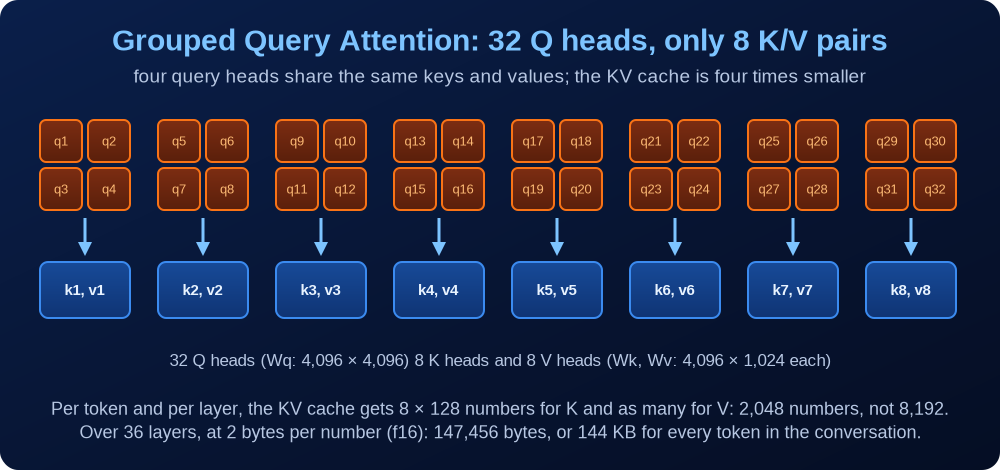
| Attention heads | 32 for queries, 8 for keys and values |
| Head size | 128 |
| MLP inner size | 12,288 |
| Vocabulary | 151,669 tokens (a matrix of 151,936 rows) |
| Context | 32,768 tokens native, 131,072 with YaRN |
| Original precision | bfloat16, 16 bits per number |
| The file in Ollama | GGUF, Q4_K_M quantization, 5.2 GB |
Sources: config.json and the model card on Hugging Face, and the qwen3:8b page in the Ollama library. A “parameter” or a “weight” is a single number in these matrices. It is not a rule, not a word, not a stored fact. It is a coefficient in a multiplication.
Pre-training: a single game, played 36 trillion times
Training a language model is, in essence, one exercise repeated endlessly: take a fragment of text and guess the next token. A token is a piece of text, usually a word or part of a word; more on that below. The model is given no grammar rules, no definitions, no labeled facts. It is given text, and it is penalized every time it guesses wrong.
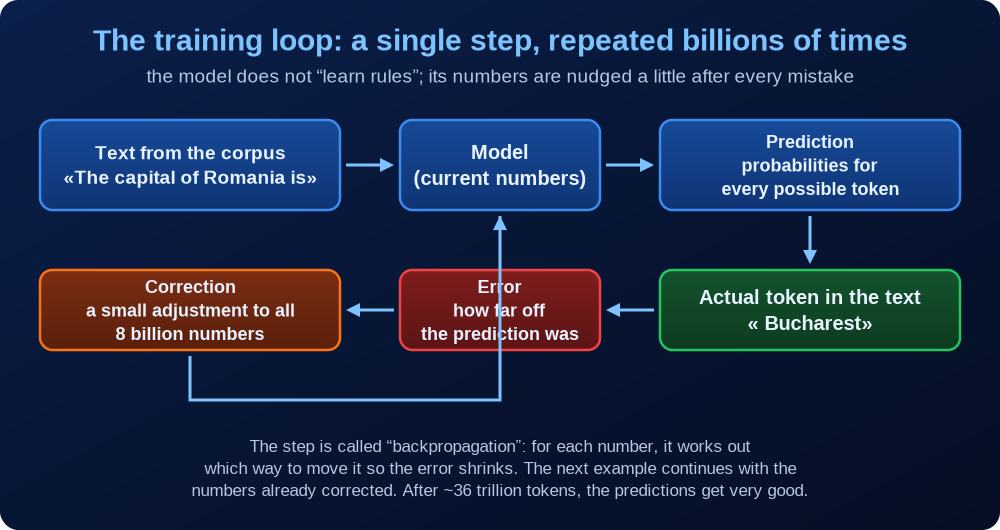
A step goes like this. With the numbers it has at that moment, the model computes a probability for every token in the vocabulary. The real text says which token was correct. The gap between what it predicted and what it should have predicted becomes a number called the error, or loss. Then a procedure called backpropagation computes, for each of the 8 billion numbers, which way it should move, by a very small amount, to make the error shrink. The next fragment of text continues with the numbers already corrected.
Qwen3 went through this cycle on roughly 36 trillion tokens, in 119 languages and dialects, in three stages described in the technical report:
| Stage | Tokens | Fragment length | Purpose |
|---|---|---|---|
| S1, general | over 30 trillion | 4,096 tokens | language, general knowledge |
| S2, reasoning | about 5 trillion | 4,096 tokens | STEM, code, reasoning, synthetic data |
| S3, long context | hundreds of billions | 32,768 tokens | long documents |
The data comes from web text, from PDF-like documents whose text was extracted with Qwen2.5-VL, and from synthetic math and code data generated with the Qwen2.5-Math and Qwen2.5-Coder models. In the third stage, the parameter that encodes token positions (the RoPE base) was raised from 10,000 to 1,000,000, so the model could follow fragments of 32,768 tokens. The technical report does not detail the cost of pre-training in GPU hours.
The result is called Qwen3-8B-Base. It can continue any text, in any style, but it is not an assistant. Ask it a question and it may just as well continue with another question, because that is what many web pages look like.
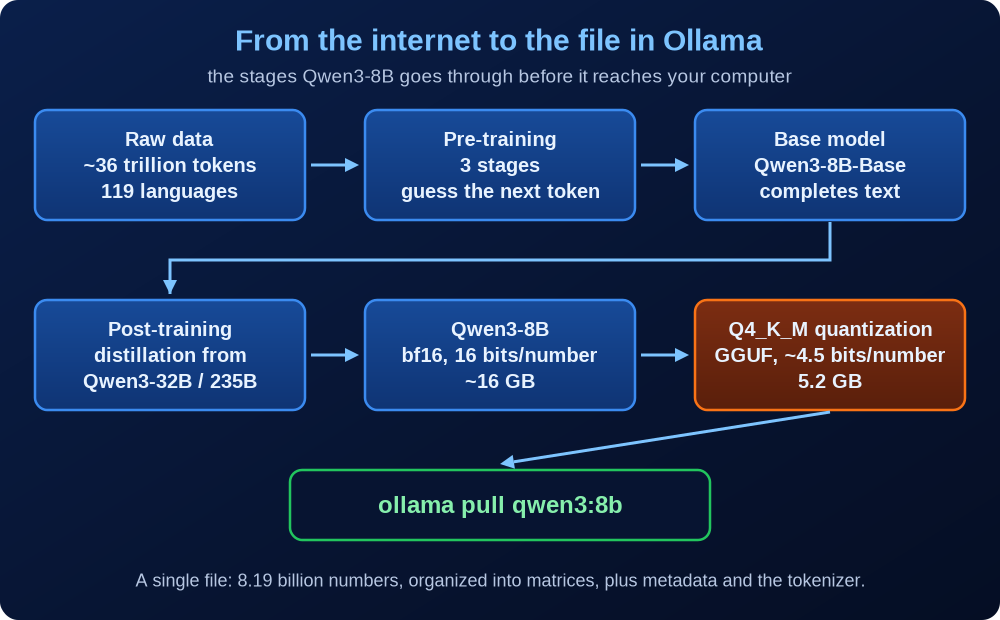
Post-training: from “complete the text” to “answer the question”
The second phase turns the text completer into an assistant that answers, follows instructions and can “think” before it answers. For the large models in the family, Qwen3-235B-A22B and Qwen3-32B, the report describes four stages: training on long chains of reasoning, generated by a model and then filtered; reinforcement learning on math and code problems with verifiable answers; the “fusion” of the thinking and non-thinking modes; and a final round of reinforcement learning for general tasks.
Qwen3-8B did not go through these four stages. The small models in the family, from 0.6B to 14B, were obtained through “strong-to-weak” distillation: the large model plays the teacher, the small one the student.
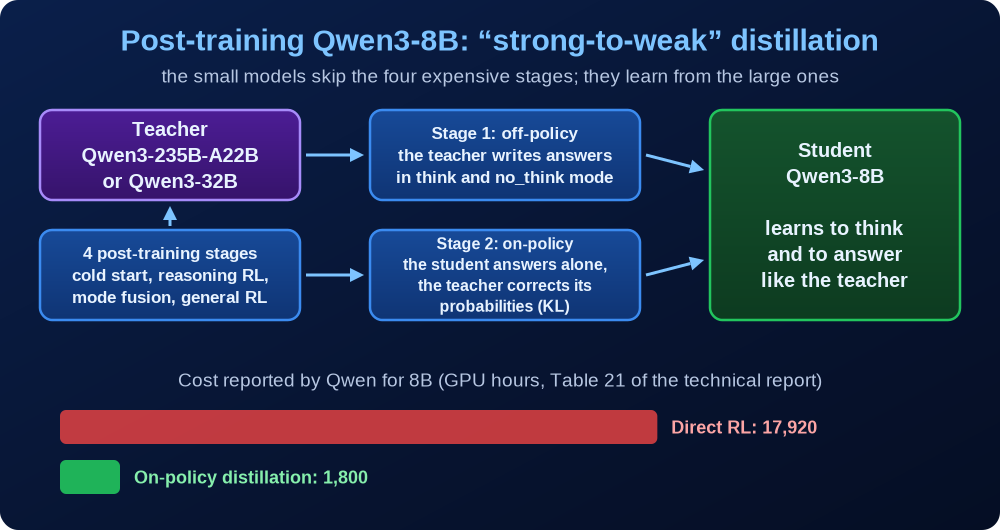
Distillation has two stages. In the first, the teacher writes answers, with and without a chain of thought, and the student is trained to reproduce them. In the second, the student answers on its own, and for each token its probabilities are pulled toward the teacher's. The report compares the cost for an 8B model, in GPU hours:
| Method | GPU hours | Result |
|---|---|---|
| Reinforcement learning, directly on the small model | 17,920 | worse |
| On-policy distillation from the large model | 1,800 | better |
This is also where the behavior you see in Ollama comes from: Qwen3 first writes a block between the <think> and </think> tags, then the answer. The thinking block is text generated token by token, exactly like the rest, and it can be turned off with /no_think in the message, with /set nothink in the Ollama terminal or with the think: false parameter in the API.
Quantization: how a 16 GB model fits into 5.2 GB
Qwen publishes the model in bfloat16, a format with 16 bits per number. The 8.19 billion numbers therefore take about 16.4 GB, more than the RAM of many laptops and far more than the memory of an ordinary graphics card. The file in Ollama is 5.2 GB, because it is quantized.
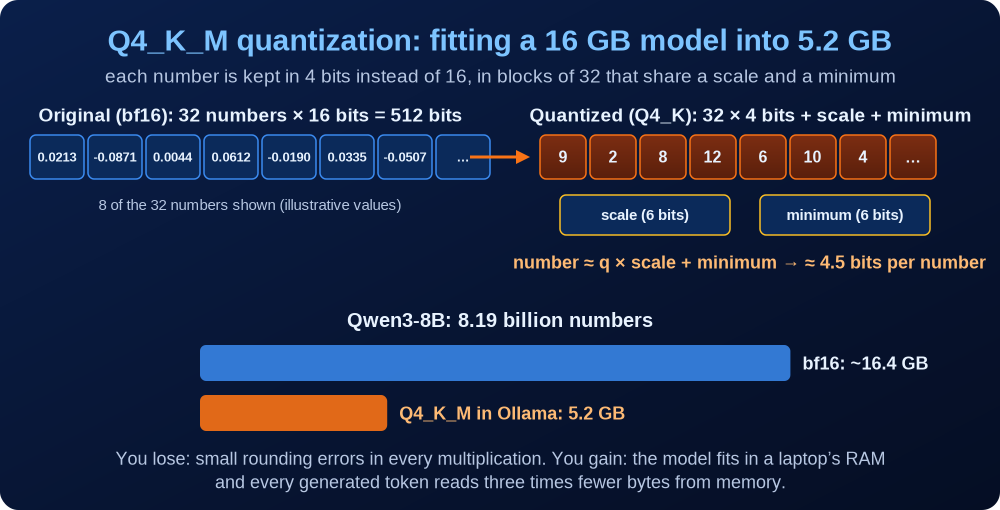
Q4_K_M quantization groups the weights into blocks of 32. For each block it keeps a scale and a minimum, and every number in the block becomes an integer from 0 to 15, in 4 bits. At run time, the number is rebuilt as q × scale + minimum. Counting the scales and minimums, that comes to about 4.5 bits per weight instead of 16. The “M” suffix means that some of the more sensitive matrices are kept at slightly higher precision, hence 5.2 GB rather than 4.6.
What you lose: every multiplication uses a rounded number, so small errors appear and add up across the 36 layers. For most tasks the difference from the original model is small. What you gain: the model fits in a laptop's memory and, as we will see at the end, generates text almost three times faster on the same machine.
Part two: a question's path through Ollama
From here on we follow what happens when you type “Ce este un LLM?” (Romanian for “What is an LLM?”) and press Enter.
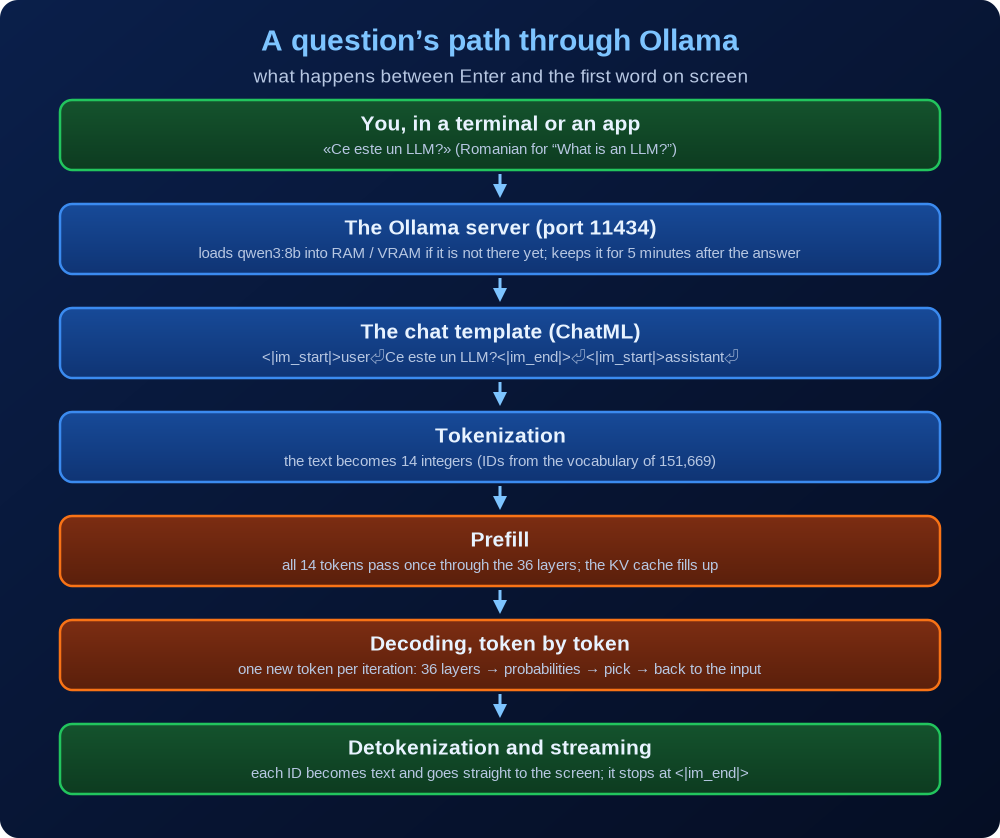
- The client sends the request to the server.
ollama runis just a client: it sends the message tohttp://localhost:11434/api/chat, together with the conversation history. A chat application or a program of your own does exactly the same thing. - The server loads the model. On the first request, the 5.2 GB are read from disk into RAM or into the graphics card's memory, which takes a few seconds. The model stays loaded for 5 minutes after the last answer, so the next question does not wait for loading again.
- The messages go into the template. The model does not receive “question” and “answer” as concepts. It receives a single text, built in the ChatML format it saw during training, with special tokens marking who is speaking:
<|im_start|>user
Ce este un LLM?<|im_end|>
<|im_start|>assistant
The text ends with an empty assistant line: the model has to continue from there. Qwen3 has no default system message, and thinking mode is on by default.
- Tokenization. The text is cut into pieces from the vocabulary and each piece becomes an integer. The template above yields 14 tokens. Details below.
- Prefill. All 14 tokens go through the 36 layers at once. For each token and each layer, two vectors, the key and the value, are computed and kept in what is called the KV cache.
- Decoding. The next token is picked from the output of the last token. It is appended to the text and goes through the 36 layers alone, using the KV cache for everything before it, and produces the next token. The loop repeats.
- Detokenization and streaming. Each chosen ID becomes text and leaves for the client immediately, which is why the answer “types itself” in front of you. The loop stops when the model picks the
<|im_end|>token, configured in Ollama as the stop signal, or at the length limit.
The API response also carries the accounting for these steps: prompt_eval_count (how many tokens the prompt had), eval_count (how many tokens it generated), plus the duration of each stage in nanoseconds. ollama run prints the same figures with the --verbose option.
Tokenization: what the model sees instead of letters
The Qwen3 vocabulary has 151,669 tokens, built with byte-level BPE: byte sequences that occur often in the training data became tokens, while rare ones break down into smaller pieces, down to single bytes if need be. That is why no text is ever “unknown”. We ran the official tokenizer on a sentence in Romanian, “Care este capitala României?” (“What is the capital of Romania?”):
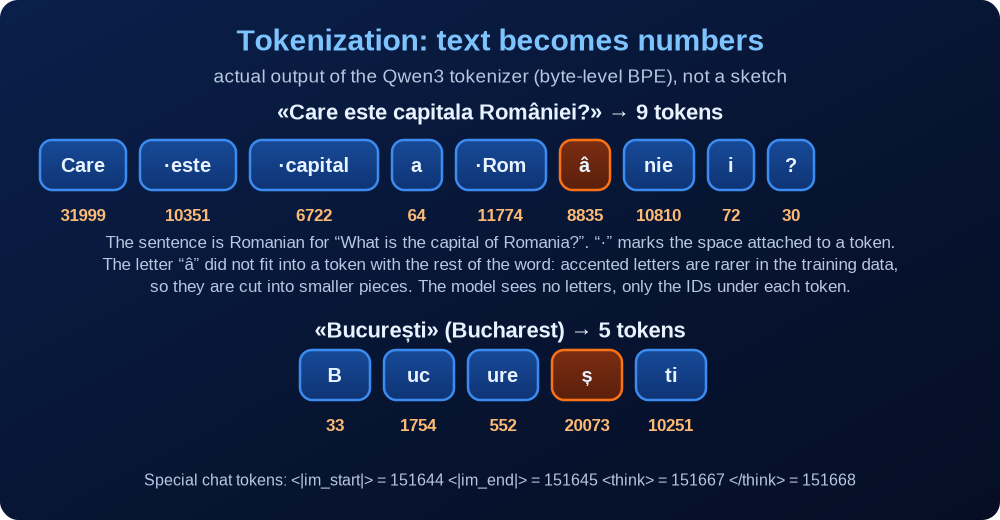
| Text | Tokens | Note |
|---|---|---|
| “Care este capitala României?” | 9 | “capitala” splits into “capital” + “a”; “României” into four pieces |
| “București” (Bucharest) | 5 | “ș” is a separate token |
| “Ce este un LLM?” | 6 | “LLM” becomes “L” + “LM” |
| the full template of the question | 14 | with <|im_start|>, user, assistant and the newlines |
Letters with diacritics are separate tokens because Romanian is a rare language in the training data. The practical consequence: a text in Romanian costs more tokens than the same text in English, so it takes up more of the context window and is generated more slowly. From this point on, the model no longer sees letters. It sees only the IDs: 31999, 10351, 6722 and so on.
The matrix inventory: what sits in the 36 layers
Before following a token through the network, here is the full inventory of the matrices, which we computed from config.json. The total matches the figures published by Qwen (6.95 billion without the vocabulary) and by Ollama (8.19 billion).
| Matrix | Size (rows × columns) | Numbers | Role |
|---|---|---|---|
| Embedding | 151,936 × 4,096 | 622.3 million | ID → vector; once, at the input |
| Wq | 4,096 × 4,096 | 16.8 million | the queries, 32 heads × 128 |
| Wk | 4,096 × 1,024 | 4.2 million | the keys, 8 heads × 128 |
| Wv | 4,096 × 1,024 | 4.2 million | the values, 8 heads × 128 |
| Wo | 4,096 × 4,096 | 16.8 million | recombines the 32 heads |
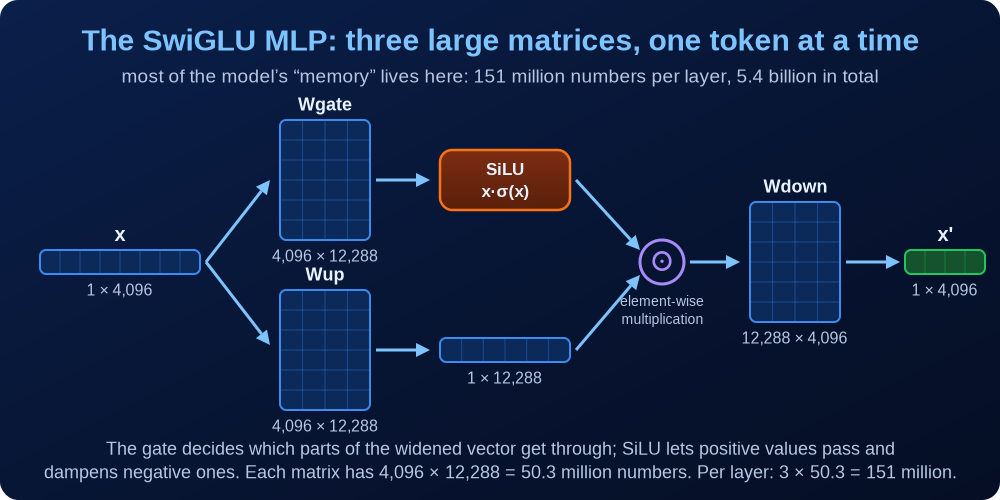
| Wgate | 4,096 × 12,288 | 50.3 million | MLP, the “gate” |
| Wup | 4,096 × 12,288 | 50.3 million | MLP, widening |
| Wdown | 12,288 × 4,096 | 50.3 million | MLP, back to 4,096 |
| RMSNorm vectors | 2 × 4,096 + 2 × 128 | 8,448 | scaling, including QK-Norm |
| Output matrix | 4,096 × 151,936 | 622.3 million | vector → score per token; once, at the output |
One layer contains Wq, Wk, Wv, Wo, Wgate, Wup, Wdown and the normalization vectors: 192.9 million numbers. Multiplied by 36 layers, that gives 6.945 billion. The embedding and the output matrix, which are separate in Qwen3-8B, add 1.245 billion. The total is 8.19 billion.
All the operations below are multiplications between a row vector and a matrix. If x has 1 row and 4,096 columns, and W has 4,096 rows and 4,096 columns, then x × W again has 1 row and 4,096 columns. Each number in the result is the sum of the products of the 4,096 numbers in x with one column of W. That is all there is to it. The rest of the article applies this rule a few hundred times.
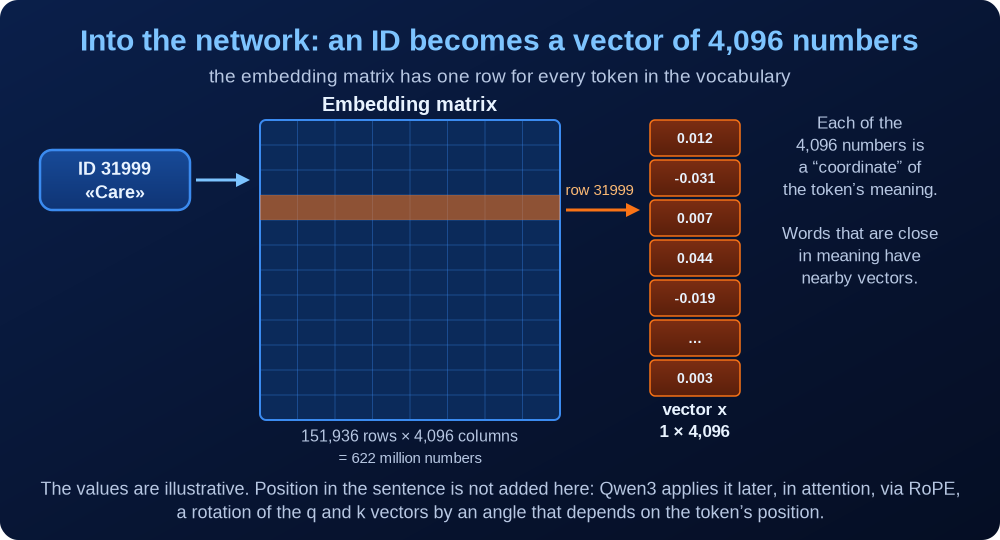
One token, step by step, through the first layer
We follow the token “Care” (ID 31999) through layer 1. Every later layer performs exactly the same operations, with its own matrices.
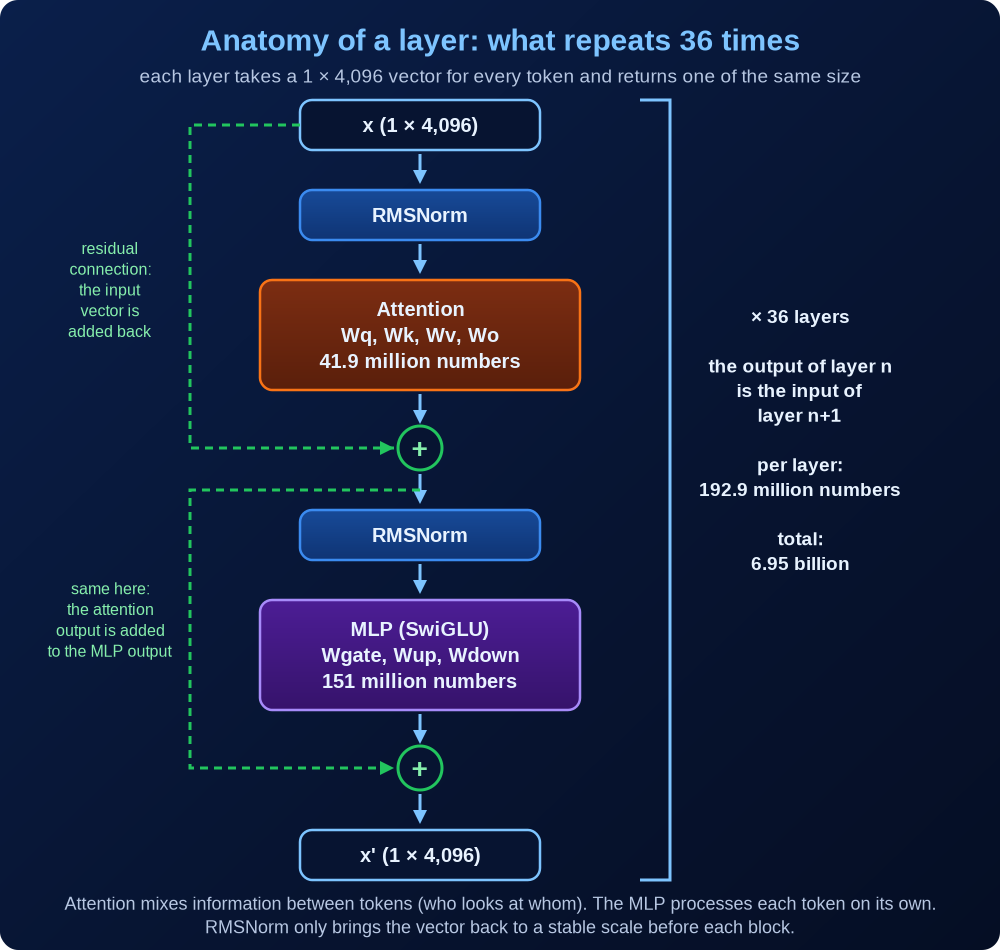
- Embedding. Row 31999 of the embedding matrix becomes the vector
x, 1 × 4,096. Each of the 4,096 numbers is a “coordinate” of the token's meaning, learned during training. Tokens with similar meanings have nearby vectors. - RMSNorm. The vector is divided by the root of the mean of the squares of its elements and multiplied, element by element, by a learned vector of 4,096 numbers. The only purpose is to keep the values in a stable range before each block.
- Queries, keys, values. Three multiplications:
x × Wqgives a 1 × 4,096 vector, which is cut into 32 pieces of 128, one for each attention head.x × Wkandx × Wveach give a 1 × 1,024 vector, that is, 8 heads of 128. Qwen3 then normalizes each q and k piece (QK-Norm), a stabilization introduced in this generation. - Position, through RoPE. Up to this point, the model does not know that “Care” is the first word. RoPE rotates the pairs of coordinates in q and k by an angle proportional to the token's position. The effect: the dot product of a q and a k depends on the distance between the two tokens, not only on their content.
- Attention scores. For each head, the vector q (1 × 128) is multiplied by the transpose of the matrix K, which holds the keys of all the tokens so far, one per row. K has n rows and 128 columns; its transpose has 128 rows and n columns; the result is a row of n scores, divided by √128 so the values do not blow up. Tokens after the current one do not exist in the text yet, so they take no part: this is “causal attention”.
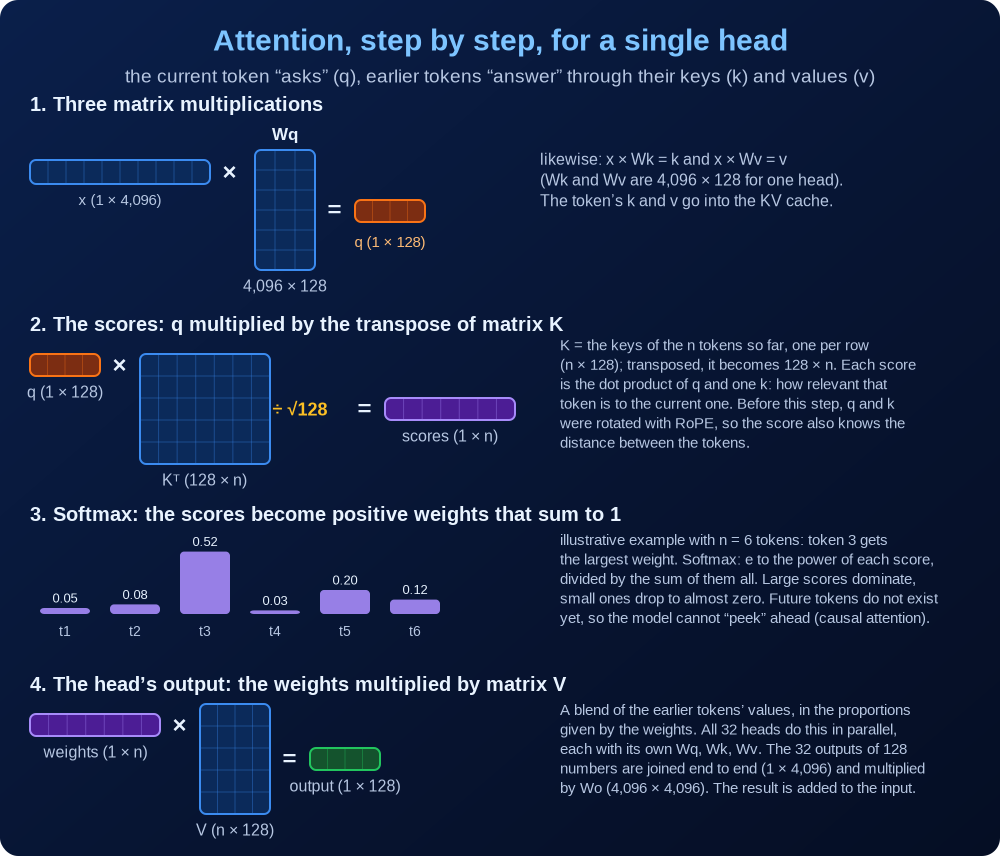
- Softmax. The scores become positive weights that sum to 1: the exponential of each score is computed, then divided by the sum of all the exponentials. Large scores become dominant, small ones go toward zero. The result says, for the current token, how much it “looks at” each of the earlier tokens.
- Mixing the values. The row of weights (1 × n) is multiplied by the matrix V (n × 128), which holds the values of the earlier tokens. The result, 1 × 128, is a weighted average of them. The 32 results of the heads are joined end to end into a 1 × 4,096 vector, which is multiplied by Wo.
- The residual connection. The attention output is added to the vector
xfrom step 1. Without this addition, the initial information would be diluted after a few layers; with it, each layer only corrects and enriches what was already there.
- MLP with SwiGLU. After another RMSNorm, the vector goes through the three large matrices.
x × Wgateandx × Wupeach give a 1 × 12,288 vector. The first goes through the SiLU function, which leaves positive values almost unchanged and strongly dampens negative ones, and is then multiplied element by element with the second. The result, still 1 × 12,288, is multiplied by Wdown and returns to 1 × 4,096. It is added once more to the vector from before.
- The next layer. The resulting vector, still 1 × 4,096, is the input of layer 2. After 36 layers, the current token's vector contains everything the model extracted from the whole conversation to predict what comes next.
The difference between the two blocks is worth remembering. Attention is the only place where tokens exchange information with each other. The MLP works on each token separately and is, in practice, where the learned associations live: that “the capital of Romania” is most likely followed by “Bucharest”, that a certain API is called in a certain way.
How many operations is that? Each vector × matrix multiplication costs about two elementary operations for every number in the matrix. For one token, through all 36 layers and the output matrix, that comes to around 16 billion multiplications and additions. A 500-token answer means 8 trillion operations. The figure is theoretical, but it explains why a laptop heats up.
The conversation's memory: the KV cache
Step 5 above multiplied q by the keys of all the earlier tokens. If those keys were recomputed for every new token, the cost would grow with the square of the conversation length. Instead, the keys and values of each token, on each layer, are computed once and kept in memory.
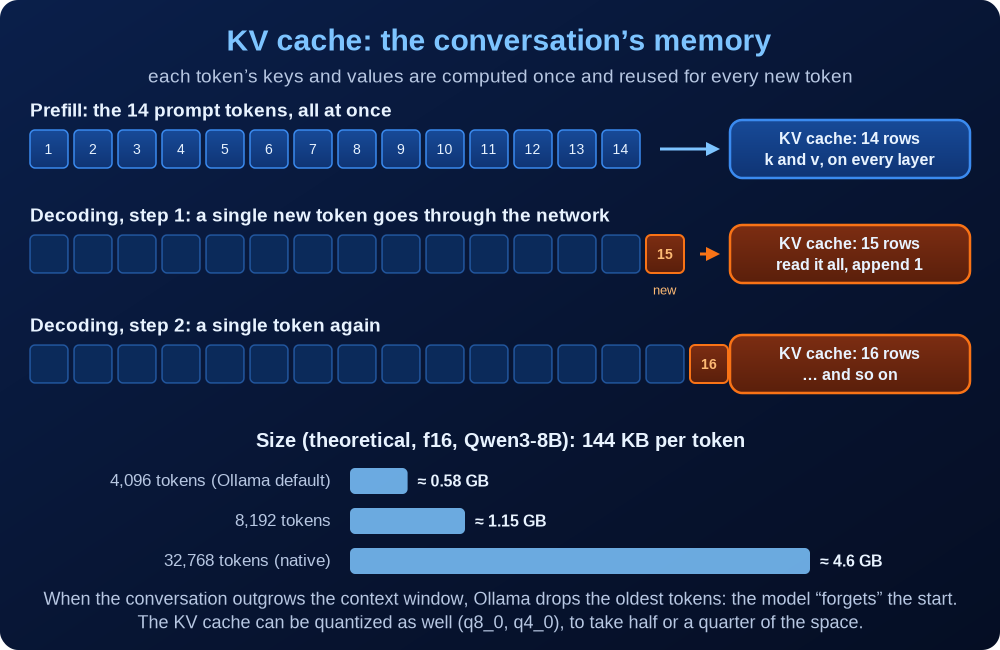
How much it takes follows directly from the architecture: 36 layers × 2 (key and value) × 8 heads × 128 numbers × 2 bytes in f16, that is, 147,456 bytes, or 144 KB for every token in the conversation. Thanks to the 8 key and value heads instead of 32, the cache is four times smaller than it would be in a classic model of the same size.
| Context window | KV cache (f16, theoretical) | Note |
|---|---|---|
| 4,096 tokens | 0.58 GB | the default in Ollama |
| 8,192 tokens | 1.15 GB | |
| 32,768 tokens | 4.6 GB | the model's native context |
Ollama starts with a 4,096-token window, according to the official documentation. Whatever exceeds the window, usually the beginning of the conversation or of the document pasted into the prompt, is cut off with no visible warning, and the model seems to “forget”. You change the window with /set parameter num_ctx 16384 in the terminal, with num_ctx in the API options, or globally with the OLLAMA_CONTEXT_LENGTH environment variable. The cache can be quantized too, with OLLAMA_KV_CACHE_TYPE set to q8_0 or q4_0, when Flash Attention is enabled.
The last step: from 4,096 numbers to a word
After layer 36, the current token's vector goes through one last RMSNorm and is multiplied by the output matrix, 4,096 × 151,936. The result is a row of 151,936 scores, one for each token in the vocabulary. The scores are called logits.
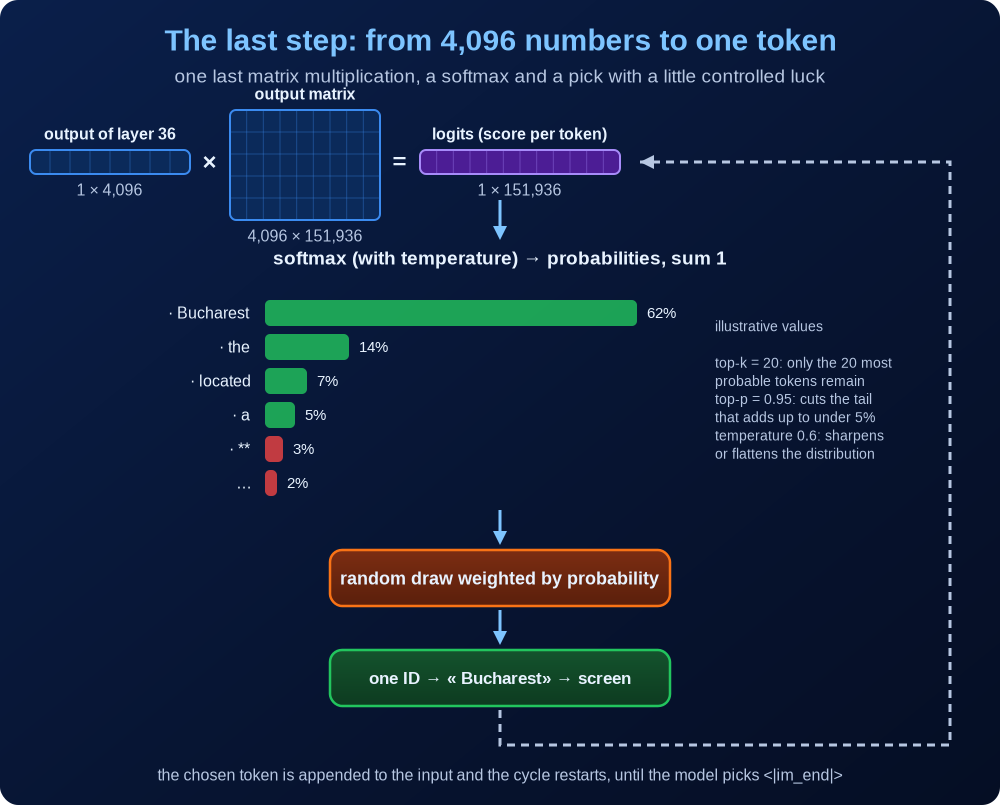
A softmax turns them into probabilities, but with one extra parameter: temperature. The scores are divided by the temperature before the exponential. A low temperature makes the distribution sharp, and the most probable token almost always wins; a high one flattens it and leaves room for rarer options. Then two filters are applied: top-k keeps only the k most probable tokens, top-p cuts the tail of the distribution that adds up to less than a threshold. From what remains, one token is drawn at random, in proportion to its probability.
In the model card, Qwen recommends temperature 0.6, top-p 0.95 and top-k 20 for thinking mode, and 0.7, 0.8 and 20 without thinking. It also warns explicitly against strictly deterministic selection of the most probable token, because it produces repetitions. This is also why the same model gives different answers to the same question: it is a random draw, a controlled one. With the seed parameter fixed, the same sequence of random numbers gives the same answer.
The chosen token is added to the input and the loop starts over: another 36 layers, another 151,936 scores, another pick. Until <|im_end|>.
Why memory matters more than the processor
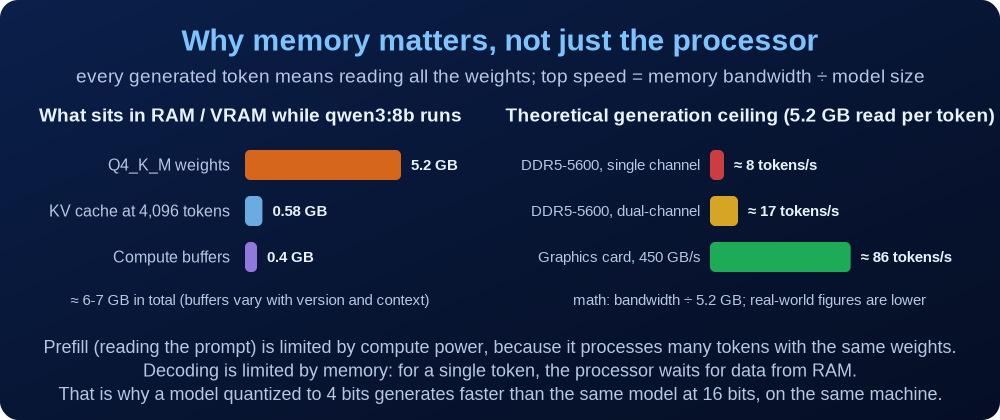
During decoding, for every new token, all 5.2 GB of weights must be read from memory once. The computation itself is small for a single token; the time goes into moving the numbers. That is why generation speed has a simple ceiling: memory bandwidth divided by model size.
| Memory holding the model | Bandwidth | Theoretical ceiling |
|---|---|---|
| DDR5-5600, a single module | 44.8 GB/s | 8.6 tokens/s |
| DDR5-5600, dual-channel | 89.6 GB/s | 17.2 tokens/s |
| Mid-range graphics card | 450 GB/s | 86 tokens/s |
The figures are theoretical ceilings, computed as bandwidth divided by 5.2 GB; in practice you get less, because of the KV cache, synchronization and the fact that the processor does not reach the maximum bandwidth. We did not measure qwen3:8b on a specific configuration for this article, so we publish no measured values. But the order of magnitude explains two things we see at clients. First: a mini PC with a single memory module generates text at half the speed of the same PC with two modules, a case we described in a separate article. Second: a model quantized to 4 bits is almost three times faster than the same model at 16 bits, because it moves three times fewer bytes per token.
Prefill behaves the opposite way. The prompt has many tokens that use the same weights, so every number read from memory is reused n times. There, compute power is what matters, and with a graphics card the difference is tens of times.
How to check on your own computer
All the figures in the article can be compared with what Ollama reports locally.
- Install Ollama from ollama.com and run
ollama pull qwen3:8b. - Run
ollama show qwen3:8b. TheModelsection shows theqwen3architecture,8.2Bparameters, the context length, the embedding length4096and theQ4_K_Mquantization. - Start a conversation with
ollama run qwen3:8b --verbose. After each answer you getprompt eval count,eval countand the speeds in tokens per second. The first value is the number of prompt tokens, the second the number of generated tokens, thinking block included. - In the same session,
/set nothinkturns off the thinking block, and/set parameter num_ctx 16384enlarges the context window. Repeat the question and compareeval countand the speed. - In a second terminal,
ollama psshows whether the model sits in the graphics card's memory, in RAM or split between them:100% GPU,100% CPUor a percentage of each. - For the full accounting, call the API directly:
curl http://localhost:11434/api/generate -d "{\"model\":\"qwen3:8b\",\"prompt\":\"Ce este un LLM?\",\"stream\":false}"
The response contains prompt_eval_count, eval_count, prompt_eval_duration and eval_duration, from which you compute your machine's real prefill and decoding speed.
Where it does not fit
A model with 8 billion parameters running locally is not a replacement for the large cloud models, and not for a database either.
- Limited and unreliable knowledge. Everything the model “knows” is compressed into those 8 billion numbers, at 4-bit resolution. For precise facts, dates, figures or legislation, the answer can be plausible and wrong. It has access to nothing after its training date and to nothing from your company, unless you put the document in the prompt.
- Romanian costs more. Diacritics and rare words are cut into more tokens, so Romanian text takes up more context and is generated more slowly than English text. Quality in Romanian is below that in English or Chinese, the dominant languages in training.
- The default 4,096-token window means roughly 8-10 pages of Romanian text, answer included. A contract pasted into the prompt is cut at the beginning with no warning, unless you raise
num_ctx. - Thinking mode is expensive. Before answering, Qwen3 can generate hundreds or thousands of reasoning tokens. On a processor with no graphics card, that means minutes of waiting for simple questions.
- Answers are not reproducible without a fixed
seed, and with a fixedseedthey are reproducible only on the same Ollama version and the same machine.
How we do it
For clients who want an AI assistant on their internal documents, without the documents leaving the company, we use exactly this kind of model, through Ollama, in Brio Argus. Documents marked on-premises are never sent to a cloud provider; the local model receives in the prompt only the relevant fragments found through hybrid search, and the answer comes with numbered citations that open in the source. The platform includes a benchmark between models. We use it to decide, together with the client, whether an 8B model on the existing hardware is enough, or whether a graphics card makes sense, or a cloud model for the documents that are allowed to leave.
We use the same local Ollama in Brio Endpoint Manager for AI analysis of server and workstation configurations, where the client does not want them to reach an outside provider.
If you want to run a local model on your company's documents and do not know what hardware you need, write to us with the machine you have and roughly how many documents. We will tell you in a few minutes whether an 8-billion-parameter model is enough and whether a memory upgrade or a graphics card is worth it.
Frequently asked questions
Is it free to run Qwen3 in Ollama?
Yes. Ollama is open source, and Qwen3 is published under the Apache 2.0 license, which allows commercial use at no charge. The only cost is hardware and electricity. For qwen3:8b you need about 6-7 GB of free memory, RAM or VRAM, and a processor or graphics card that Ollama supports.
What computer do I need for qwen3:8b?
The quantized model takes 5.2 GB, plus the KV cache and the buffers, so 16 GB of RAM is a comfortable minimum for running on the processor. Speed depends on memory bandwidth: two RAM modules in dual-channel double the ceiling compared with a single module. A graphics card with at least 8 GB of memory holds the whole model in VRAM and generates several times faster than the processor.
Why does the model answer the same question differently?
Because the last step of generation is a random draw. The model computes a probability for every token in the vocabulary, and the next token is picked at random, in proportion to those probabilities, after the temperature, top-k and top-p filters. Qwen recommends this method and warns that strictly deterministic selection of the most probable token produces repetitions. With the seed parameter fixed, on the same machine and the same Ollama version, the answer repeats.
Does the local model send data over the internet?
No. Once downloaded, Ollama works fully offline: by default the server listens only on localhost:11434, and the model has no network component. The prompt, the documents in it and the answer stay on your machine. If you expose the server on the network or on the internet, protecting access is your responsibility, because Ollama has no authentication of its own.
Does Qwen3 work in Romanian?
Yes. Romanian is among the 119 languages in the training data, and the model answers coherently. Two limits are worth knowing: diacritics and rare words are cut into more tokens, so Romanian text takes up more context and is generated more slowly, and quality stays below English, the dominant language in training. For answers from a company's documents, the model does well when the relevant fragments are given to it in the prompt.


