
BrioLogic application
Brio Projects
Everything that happens on a project with field teams, in a single application: the daily report, attendance, planning, materials, machinery and invoices.
Brio Projects grew out of the real needs of a construction company with several projects running in parallel, and it works just as well in building services, installation work, energy, infrastructure, fit-out or field service: anywhere there are projects, people in the field, and materials and equipment to keep track of. Each module answers an everyday question: who was on the project today, what got done, what is coming next week, where the materials are, who has the machine and what it actually cost.
The site manager fills in the report on a phone, and in the evening, at the set time, the PDF goes out on its own to the project manager and the client. Employees clock in with GPS or a QR code, planning starts from the cost estimate and ends up in a Gantt chart, and invoices come straight from SPV, the e-invoicing system of ANAF (the Romanian tax authority). Each company gets a dedicated instance, in the BrioLogic cloud or on its own infrastructure.
At a glance
- Daily project report from a phone, generated as a PDF in the official report format, with photos, weather, attendance, signature and stamp, sent automatically by email and archived with a sequential number.
- Self clock-in with GPS and QR code: check-in and check-out validated by geofencing, a live dashboard for each project, alerts for missing clock-ins.
- Planning on the project structure (phases, modules, cost estimate line items), Gantt with dependencies, a work schedule for the coming weeks and tracking of daily commitments.
- Materials from invoice to project: receipt, central warehouse and local warehouses, distribution and allocation by phase, with traceability for every invoice line.
- Equipment in custody with QR labels: pickup by scanning, transfer to a colleague, confirmation and history.
- Invoices and payments: e-Factura import from SPV, scheduled and completed payments, bank statements with automatic matching, Open Banking, the National Bank of Romania (BNR) exchange rate.
- HR and timesheets: staff, contract periods, leave and balances, overtime, expiring documents and medical checks, monthly timesheets.
- Executive dashboard and project dashboard with traffic lights, in-app and email notifications, granular roles and permissions, per-project access.
- A dedicated instance for each company, in the BrioLogic cloud or on its own infrastructure, used from the browser on desktop and phone.
How it all fits together
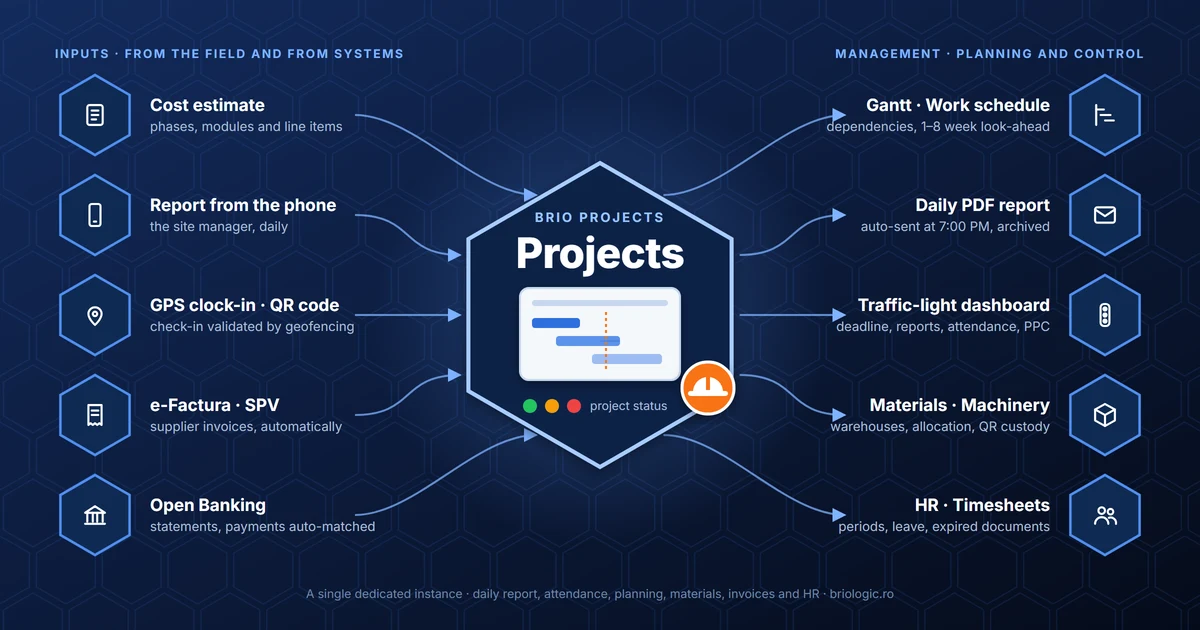
Data goes in once, from the field and from existing systems, and planning, reports and control all come out of the same place. No files sent by email and no retyping.
Who it's for
The application is designed for companies that deliver projects with field teams, in construction and building services, installation work, energy, infrastructure, fit-out or field service, that have anywhere from a few to a few dozen open projects, their own crews and subcontractors, and that want to see everything from one place. Each role sees only what concerns it.
- Management: an executive dashboard across all projects, with activity, events, finances, materials, attendance and subcontractors, plus a banner with the projects that haven't reported today.
- Project manager: project structure, Gantt planning, work schedule, project status with estimated versus actual cost, daily report received automatically.
- Site manager, in the field: daily report from the phone, QR code for clocking in, live attendance, daily staff, machinery, events, photos, weather.
- Field employees: GPS self clock-in and “My space”, with hours worked, leave, requests, documents, equipment in custody and notifications.
- Warehouse and purchasing: goods receipt, stock by warehouse, distribution and allocation of materials, per-project reports.
- Finance and HR: invoices, payments, bank statements, SPV, subcontracting, progress statements, timesheets, leave, expired documents.
The daily project report, without paperwork and without evening phone calls
Each project has its own dashboard: activities, daily staff, machinery, events, subcontractors, photos, weather and a task list. The daily report is generated from the same data, in the format the client requires.
How a day goes
- Filled in on the phone. The site manager checks off the day's activities, machinery, events and subcontractors. Sections with no content are marked “nothing to report”.
- Planned activities. What comes tomorrow is written on the same page and appears in the report, so the client knows what to expect.
- PDF with photos. The report is generated as a PDF with photos, weather, attendance and the signature and stamp of the person who prepared it.
- Automatic sending. At the configured time (7:00 PM by default) the report goes out by email to the project manager, the site manager and any added recipients: the client, the site supervisor (the client's licensed works inspector) or another external supervisor.
- Numbered archive. Every submission stays in the project archive, with the report number, the version (full or executive summary) and the recipients.
Attendance and daily staff
The list of people present is fed from GPS self clock-in and can be corrected manually. Subcontractor staff are recorded separately, so that they appear correctly in the report.
Photos and weather
Photos are uploaded straight from the phone and go into the PDF with a configurable layout. The weather history is saved automatically for each project and helps justify lost days.
Project status
The estimated cost from the cost estimate versus the actual cost from timesheets and materials, for each project, with the project currency for the cost estimate and RON (Romanian lei) for actual costs.
GPS and QR self clock-in, timesheets without manual touch-ups
The employee records arrival and departure from the phone. The app checks the position against the project's coordinates and automatically suggests the nearest project.
- Check-in and check-out with geofencing: GPS validation against the project perimeter, a QR code displayed on site as an alternative or as confirmation, relocation from one project to another during the day, monthly history for each employee.
- Live GPS dashboard: who is on each project right now, on a map, with a view across all projects and details for each one. An alerts job flags missing or incomplete clock-ins and syncs them automatically into the daily timesheets.
- Timesheets and absences: per-project timesheets and a monthly timesheet per person, overtime, absences and public holidays, import from external files, the list of missing timesheets for the current week and for past periods.
From the cost estimate to Gantt and the weekly work schedule
The project structure follows the cost estimate. The cost estimate is imported and turned into phases and modules, and planning is built on it, with dependencies between tasks and a working-day calendar. A project has phases (for example “Structure”), each phase has modules (for example “Slab at level ±0.00”) with a start date, end date, subcontractor and progress, and each module contains the cost estimate line items with quantity, unit of measure and the breakdown of materials, labor, machinery and transport.
- Cost estimate import: upload, preview by phases and modules, then import. Line items come with their full breakdown.
- Planning setup: a step-by-step wizard proposes start and end dates for the modules and writes them into the plan. What you see in the preview is exactly what gets saved.
- Gantt with dependencies: an interactive chart, links between tasks with lag, automatic cascading of dates when a predecessor changes, PDF and Excel export.
- Work schedule (look-ahead): what is in progress and what starts in the next 1–8 weeks, grouped by phase, with statuses calculated at the reference date: overdue, not started and late, in progress, blocked by predecessors. PDF export for the weekly meeting.
- Daily commitments (PPC): in the morning the site manager commits to what will be finished today and confirms it in the evening. The percentage of commitments met is tracked over time and can go into the daily report.
- Project dashboard with traffic lights: four green, yellow or red blocks for schedule, reporting, attendance and commitments. The manager sees within seconds where to step in.
Every material and every machine has a place and someone responsible
Receipt and warehouses
Goods are received against the supplier's invoice, into a central warehouse or into the local warehouses on the projects. Stock is kept in lots, linked one-to-one to the invoice lines, with a shared materials catalog.
Distribution and allocation
Materials are distributed from the warehouse to projects and allocated to phases and modules, with controlled cancellation. The per-project distribution and allocation reports and the list of invoices distributed partially or without materials show right away what remains unallocated.
Equipment in custody
Each piece of equipment has a QR label. The employee picks it up by scanning, with the project suggested from the GPS position, and can transfer it to a colleague, who accepts or declines in the app, while “My equipment” and the movement history show at any time who has what.
Invoices come in on their own, payments match on their own
The finance module links supplier invoices to projects, materials and payments, so that a project's cost is real, not estimated.
- e-Factura and SPV: authentication with ANAF using the company's certificate, listing of received invoices, XML and PDF download, import into the app. An automated job runs the import at set intervals.
- Invoices and payments: invoices with VAT per line, advance payments, reversals, scheduled and completed payments, partial payments, paid invoices. Checks for invoices that are overpaid, not covered by payments, missing a PDF or with multiple VAT rates.
- Bank statements and Open Banking: statement import, automatic matching of payments to invoices (one-to-one or one-to-many), bank accounts connected through Open Banking and transactions synced automatically.
- Subcontractors and progress statements: subcontractors, subcontracting agreements, per-project progress statements and pricing on cost estimate line items.
- Partners, companies, banks: shared catalogs, BNR exchange rate updated automatically, several group companies in the same instance.
People, their contracts and their deadlines
- Staff and periods: staff with contract periods, teams and org chart, hires and departures for the current year, HR import and IBAN import, employee deduplication.
- Leave and deadlines: leave, balances and requests, expiring documents, occupational health checks, psychological clearance, and an HR Dashboard showing what is missing: timesheets, balances, periods.
- My space, each employee's own page: hours worked, projects, calendar, documents, leave and requests, health and medical checks, equipment in custody, missing timesheets, notifications and email preferences.
Security and administration
- Roles and permissions: every page and action has its own permission. Roles group permissions, and access to projects is granted explicitly, per person. The menu shows only what the user can open.
- Notifications: in-app notifications with a direct link, and email configurable per notification type. Each employee can turn off emails for the types they are not interested in.
- Automated jobs: daily report, GPS alerts, SPV import, BNR exchange rate, bank statements, Open Banking, weather, database backup and cloud backup, all managed from one page, with a log for every run.
- Audit and backup: login audit, a log of sensitive changes, scheduled backups that can be downloaded from the app.
Where it runs
A dedicated instance, the data stays with the company
Brio Projects is not a multi-tenant service. Each client gets its own instance, with its own database and its own storage for photos, reports and documents. One company's data is never shared with another.
In the BrioLogic cloud or on your own infrastructure
The instance runs in the cloud managed by BrioLogic or on the company's servers, in Docker containers on Linux, with automatic local and cloud backup. It is used from the browser, on desktop and phone, with nothing to install on devices. Roles, report recipients and automated jobs are configured in the app, without touching the code.
Technology
| Web interface | React with Material UI, responsive design, Romanian and English, mobile-first for the field pages; interactive Gantt and maps for GPS attendance |
|---|---|
| Server and reports | Python, server-side PDF generation, token-based authentication and permissions checked on every action |
| Database | Microsoft SQL Server, one per instance, with versioned migrations |
| Integrations | ANAF SPV (e-Factura), Open Banking, BNR exchange rate, email via SMTP, weather services |
| Deployment | Docker on Ubuntu Server, in the BrioLogic cloud or on-premises, automatic local and cloud backup |
In development
The application is built in modules, and new features are added without affecting existing installations. Next on the list:
- Cost estimates and projects in multiple currencies, with the exchange rate at the document date.
- Additional device and route checks for self clock-in.
- Extending the project traffic-light dashboard and the executive dashboard.
- Additional project control reports, modeled on professional planning tools: baselines and variances against them.
Frequently asked questions
Can we use only some of the modules?
The modules are linked to each other, so the application is used as a whole: time tracking starts from the staff in HR, and the daily report and the actual project cost rely on the recorded materials and invoices. What you adapt is access: through roles and permissions, each team sees only the pages that concern it.
Does it work on a phone?
Yes. The field pages (self clock-in, daily report, equipment pickup by QR code, “My space”) are designed for phones and open in the browser, without installing an app.
Where is the data stored?
In the company's dedicated instance, on the server chosen by the client: the BrioLogic cloud or the company's own infrastructure. The database is Microsoft SQL Server, with scheduled local and cloud backups.
Does it integrate with ANAF?
Yes. Received invoices are listed and downloaded from SPV (e-Factura) with the company's certificate, and the import can run automatically at set intervals.
Can we import our existing cost estimates?
Yes. The cost estimate is uploaded, previewed by phases and modules, then imported with the resource breakdown of each line item. The resulting structure is the basis for planning and for allocating materials.
What happens if a project hasn't reported?
The executive dashboard shows a banner with the projects that haven't reported today, and every successful submission appears in the project archive, so a missing report is visible immediately.
How does time tracking work if an employee works on two projects on the same day?
The employee checks out of the first project and checks in to the second, from the phone. The app automatically suggests the nearest project based on the GPS position, and the hours are split correctly between projects in the daily timesheets.
How is it licensed?
Per instance, with updates and support included. We put together a quote after a short conversation about the number of projects, employees and application users.
Want to see Brio Projects on your own projects?
We schedule a demo on a real company project: we import a cost estimate, set up a project and go through a reporting day together.